


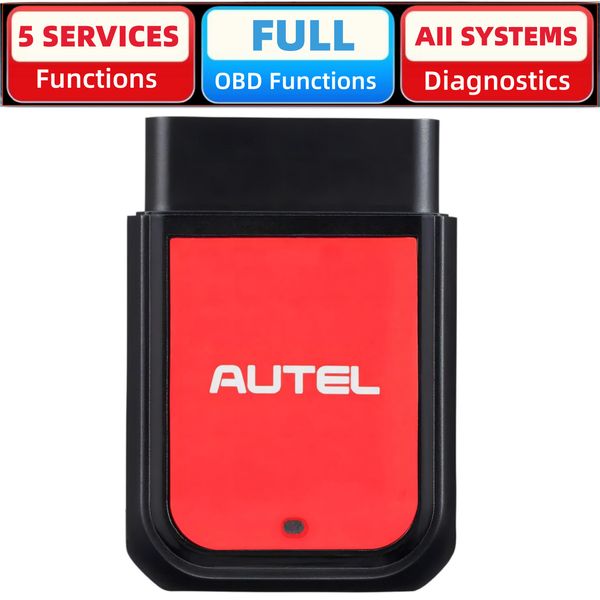




Autel MaxiAP AP2500 Obd2 Scanner Bluetooth Code Reader Upgraded of AP200 H/C/M


More Functions For The Upgrade Bluetooth Code Reader
> Half the size of a hand. Easy to carry everywhere and put in your pocket.
> Identify vehicles, store and access past records, and diagnostic reports in 60 seconds with Auto VIN.
> Scan/diagnose all available systems. Perform all-around code reading & clearing and quickly locate problems.
> 5 service functions: oil maintenance, TPMS(tire pressure), wiper replacement, BMS reset, EV battery diagnostics.
> Provides OBDII test, including the ability to emissions results, view freeze frame and live data. It also offers enhanced in-depth scanning for all vehicle systems, and helps you to easily read and clear codes.

Five Hot Service Functions
The system will guide you through the complete performance for various service operations. Besides the 5 special functions also do a lot for your home repair. Its plug-and-play features make it useful for beginners and experts alike.
The Six Main Functions in the Diagnostics Application for OBDII Vehicles

The Six Main Functions in the Diagnostics Application are Especially Available for OBDII Compliant Vehicles
This engine code reader also performs all OBD2 tests to quickly determine the cause of the engine light: live data, I/M readiness, monitor tests, component test, onboard monitor test, etc.
•Read Code: Show the detailed description of DTCs(current, pending, and permanent codes)
•Erase Code: Clear DTCs after repairing and turn off the check engine light.
•Live Data Stream: Displays the OBDII/EOBD live data in in a live graphic (waveform) display.
•Vehicle Information: Displays the vehicle information such as calibration identification, vehicle identification number (VIN), calibration verification number (CVN), and more.
•On-Board Monitor Test: Displays the results of On-board Monitor tests.
•I/M Readiness: Check the readiness of the various systems on the vehicle.
•Freeze Frame: Snapshot of the critical parameter values in OBDII compliant vehicles when the DTC is set.
•O2 Sensor Test: Retrieve and view O2 sensor monitor test results for the most recently performed tests from the vehicle’s on-board computer.
All System Diagnostics: Save Money & Save Time

All System Diagnostics: Save Money & Save Time
The Bluetooth dongle performs the fault scanning for vehicle diagnosis. The Diagnostics application can read & erase DTCs, view live data, freeze frame data, and vehicle information, and also provide helpful information when performing services such as oil resets, TPMS, BMS, and more.
- There are three vehicle scanning methods: basic scan, custom scan, and full scan.
- The software for one vehicle brand is free and permanently valid for the Custom Scan and Full Scan
- On the top of the diagnostic report screen, a dashboard with specific vehicle health rating and the total number of DTCs will be presented after scanning.
- Quick vehicle identification with Auto VIN. Store and quickly access past records, and diagnostic reports.
- DTC query/TSBs/definitions of common dashboard lights/100-kilometer dynamic acceleration test are provided
- Features "Find a Local Repair Shop function" for quick maintenance and service needs.
- Automatic identification + manual input makes you no more waste time seeking vehicle information (make, model, year).
Quick Reference Guide: Simple and Easy to Operate
|
|
|
|
|
|---|---|---|---|
Download Install AppScan the OR code or search for the AutelMaxiap Diag in the Apple App Store or Google Play Store to download and install the app to your device. |
Register & Log in & Key on-Open the MaxiAp Diag app and tap Register, Follow the on-screen instructions to complete your registration Log in. -Turn Vehicle ignition to the On position. |
Locate the OBDII Port-Plug the Bluetooth dongle into the vehicle OBDII port, The vehicle OBDII port is generally located under the vehicle dashboard. -Add the AP2500 dongle to your Device Manager on the MaxiAP Diag app. |
Bluetooth Connect & Bind-Launch the Settings on your phone and enable Bluetooth. -After the device is connected via Bluetooth, the connection status is shown as " Connected " in the MAXIAP Diag app. -Bind your VCI with your account. |


Powerful Functionality
MaxiAPAP2500 is a powerful and essential scan tool specially designed for individual car owners. It includes a Bluetooth (BT) dongle and the Autel MaxiAP Diag app.Thisscanner covers 45+ car brands and works on most OBDII compliant vehicles from 1996 to 2024. Intelligent plug-to-play design is very convenient for us.
- Powerful Vehicle Coverage for Global Users & Car Models
- Supports late model vehicles using faster CANFD communications. Autel AP2500E runs 5x faster speed on GM models (2019 and later)
- 3 Languages supports: English/French/Spanish
- Features "Find a Local Repair Shop function" for quick maintenance and service needs.
- Bluetooth Diagnosis for Android / iOS

Shipping Overview:
• Shipping: Standard Domestic Shipping within the United States charges first item USD 6.99 and additional item USD 3.0 each. Standard International Shipping from United Kingdom, Germany, Italian and Japan to the United States charges first item USD 11.99 and additional item USD 4.0 each.
• Import Duty: Everymarket collects applicable duties and taxes on goods imported into the U.S. at checkout, it's calculated based on the goods value multiply by the rate. For United Kingdom and China goods is 10%, Germany, Italian and Japan goods is 15%. We are committed to making your U.S. shopping experience simple and transparent. The method of delivery—either Delivered Duty Paid (DDP) or Delivered Duty Unpaid (DDU)—depends on whether duties and taxes are collected at the time of your purchase.
• Order Processing: Please allow 1-2 business days for order processing and preparation before shipment.
• Domestic Shipping: Orders within the U.S. are shipped via USPS or FedEx, depending on the origin of the product. Average transit times to the United States is 3 - 7 Business days and average transit times to International is 7 - 14 Business days
• International Shipping: Currently, we only ship within the USA.
• Tracking Information: Every order is trackable. You will receive a tracking number once your order has been shipped. Products may be shipped from various global fulfillment centers.
Shipping Delays:
Please note that shipping times may vary due to factors beyond our control, such as weather conditions, natural disasters, or peak holiday periods. While we strive to ensure timely delivery, the exact arrival time cannot be guaranteed and is managed by the shipping carrier.
Shipping Options:
-
Standard Delivery: Most orders are shipped within 3-7 business days. Larger items may utilize LTL shipping for safe handling.
-
Handling Time: We handle shipments on business days (Monday - Friday), with a preparation time of 1-2 days.
-
Additional Charges: Some items require additional shipping charges due to their size, weight, or special handling. These charges are specified on the product pages and are not eligible for shipping discounts.
-
Exclusions: Gift cards, packaging, taxes, and prior purchases do not count toward the minimum purchase requirement for free shipping. This offer is valid only for shipments to U.S. addresses, including Puerto Rico.
Delivery Details:
-
Estimates: Standard shipping within the US typically takes 3-7 business days. These are estimates and not guarantees.
-
Shipping Restrictions: We ship to all 50 states, Washington, DC, U.S. territories, and APO/FPO/DPO addresses. Shipping options vary based on the delivery address.
-
Remote Areas: Shipments to remote areas may incur additional charges or require pickup from a nearby shipping partner’s location.
Shipping Confirmation:
You will receive a shipping confirmation email with a tracking number as soon as your order is dispatched. If you do not receive this email immediately, please be assured that your items will arrive within the estimated delivery window provided at checkout.
Order Modifications:
If you need to cancel or modify your order, please contact our customer support immediately.
Issues with Delivery:
If your order shows as delivered but you have not received it, please contact the shipping carrier directly to resolve the issue. For persistent problems, contact our customer service at cs@everymarket.com.
Customer Support:
Our team is available 24/7 to assist you with any questions or concerns regarding your order. We are committed to ensuring a smooth shopping experience.
Return & Refund Policy Overview
Please review our return and refund policies below to ensure a smooth transaction process.
Return Policy
-
Duration: You have 30 days from receiving your item to initiate a return.
-
Condition: Items must be unworn, unwashed, with original tags and packaging intact.
-
Shipping Costs:
- If your return is approved due to a defective, damaged, or incorrect item, we will provide a prepaid return shipping label at no cost.
- If the item has no quality issues and matches the product listing and description, please contact our Customer Service team before returning it. Once your return is authorized, you must return the item according to the provided instructions. In this case, the return shipping cost is the customer's responsibility.
- We are not responsible for return shipping costs for items returned without prior authorization. -
Packaging: Ensure returned items are well-packaged to avoid damage during transit.
-
Tracking: Use a trackable and insured shipping method as we are not liable for items lost or damaged on return.
-
Initiating a Return: Contact us at cs@everymarket.com to start your return. We will provide a return shipping label and instructions upon approval. Returns without prior approval will not be accepted.
How to Return
-
Method: Returns must be sent back by mail to the address provided in the return instructions.
Return Label
-
Please contact us to get return labels.
Product Conditions for Return
-
Eligible Products: Returns are only accepted for items in new condition.
Nonreturnable Items
Certain items are not eligible for return:
-
Electronic devices after 30 days (e.g., computers, laptops, Kindles)
-
Gift cards, prepaid game cards
-
Perishable goods, live insects, some jewelry, some health and personal care items
-
Customized or personalized products
-
Items with special shipping restrictions
Refund Policy
-
Window: Eligible products may be returned within 30 days of delivery for a refund.
-
Refund Method: Refunds are processed to the original payment method or as store credit for items purchased with gift cards.
-
Processing Time: Refunds are processed within 3-5 business days after we receive the return; please allow additional time for shipping and bank processing.
Claims
Inspect your order upon arrival and report any defects, damages, or incorrect items immediately to allow us to address the issue. For claims, contact our support team with details of the issue.
Exchange Policy
For the quickest service, return your original item and place a new order for the desired product once your return is accepted.
Return Address
EveryMarket Customer Service 2101 E Terra Ln, O'Fallon, MO 63366
Customer Support
Available 24/7 for any questions or assistance needed:
-
Phone: +1 (800) 660-3783
-
Email: cs@everymarket.com
More Functions For The Upgrade Bluetooth Code Reader
> Half the size of a hand. Easy to carry everywhere and put in your pocket.
> Identify vehicles, store and access past records, and diagnostic reports in 60 seconds with Auto VIN.
> Scan/diagnose all available systems. Perform all-around code reading & clearing and quickly locate problems.
> 5 service functions: oil maintenance, TPMS(tire pressure), wiper replacement, BMS reset, EV battery diagnostics.
> Provides OBDII test, including the ability to emissions results, view freeze frame and live data. It also offers enhanced in-depth scanning for all vehicle systems, and helps you to easily read and clear codes.
Five Hot Service Functions
The system will guide you through the complete performance for various service operations. Besides the 5 special functions also do a lot for your home repair. Its plug-and-play features make it useful for beginners and experts alike.
The Six Main Functions in the Diagnostics Application for OBDII Vehicles
The Six Main Functions in the Diagnostics Application are Especially Available for OBDII Compliant Vehicles
This engine code reader also performs all OBD2 tests to quickly determine the cause of the engine light: live data, I/M readiness, monitor tests, component test, onboard monitor test, etc.
•Read Code: Show the detailed description of DTCs(current, pending, and permanent codes)
•Erase Code: Clear DTCs after repairing and turn off the check engine light.
•Live Data Stream: Displays the OBDII/EOBD live data in in a live graphic (waveform) display.
•Vehicle Information: Displays the vehicle information such as calibration identification, vehicle identification number (VIN), calibration verification number (CVN), and more.
•On-Board Monitor Test: Displays the results of On-board Monitor tests.
•I/M Readiness: Check the readiness of the various systems on the vehicle.
•Freeze Frame: Snapshot of the critical parameter values in OBDII compliant vehicles when the DTC is set.
•O2 Sensor Test: Retrieve and view O2 sensor monitor test results for the most recently performed tests from the vehicle’s on-board computer.
All System Diagnostics: Save Money & Save Time
All System Diagnostics: Save Money & Save Time
The Bluetooth dongle performs the fault scanning for vehicle diagnosis. The Diagnostics application can read & erase DTCs, view live data, freeze frame data, and vehicle information, and also provide helpful information when performing services such as oil resets, TPMS, BMS, and more.
- There are three vehicle scanning methods: basic scan, custom scan, and full scan.
- The software for one vehicle brand is free and permanently valid for the Custom Scan and Full Scan
- On the top of the diagnostic report screen, a dashboard with specific vehicle health rating and the total number of DTCs will be presented after scanning.
- Quick vehicle identification with Auto VIN. Store and quickly access past records, and diagnostic reports.
- DTC query/TSBs/definitions of common dashboard lights/100-kilometer dynamic acceleration test are provided
- Features "Find a Local Repair Shop function" for quick maintenance and service needs.
- Automatic identification + manual input makes you no more waste time seeking vehicle information (make, model, year).
Quick Reference Guide: Simple and Easy to Operate
|
|
|
|
|
|---|---|---|---|
Download Install AppScan the OR code or search for the AutelMaxiap Diag in the Apple App Store or Google Play Store to download and install the app to your device. |
Register & Log in & Key on-Open the MaxiAp Diag app and tap Register, Follow the on-screen instructions to complete your registration Log in. -Turn Vehicle ignition to the On position. |
Locate the OBDII Port-Plug the Bluetooth dongle into the vehicle OBDII port, The vehicle OBDII port is generally located under the vehicle dashboard. -Add the AP2500 dongle to your Device Manager on the MaxiAP Diag app. |
Bluetooth Connect & Bind-Launch the Settings on your phone and enable Bluetooth. -After the device is connected via Bluetooth, the connection status is shown as " Connected " in the MAXIAP Diag app. -Bind your VCI with your account. |
Powerful Functionality
MaxiAPAP2500 is a powerful and essential scan tool specially designed for individual car owners. It includes a Bluetooth (BT) dongle and the Autel MaxiAP Diag app.Thisscanner covers 45+ car brands and works on most OBDII compliant vehicles from 1996 to 2024. Intelligent plug-to-play design is very convenient for us.
- Powerful Vehicle Coverage for Global Users & Car Models
- Supports late model vehicles using faster CANFD communications. Autel AP2500E runs 5x faster speed on GM models (2019 and later)
- 3 Languages supports: English/French/Spanish
- Features "Find a Local Repair Shop function" for quick maintenance and service needs.
- Bluetooth Diagnosis for Android / iOS
Shipping Overview:
• Shipping: Standard Domestic Shipping within the United States charges first item USD 6.99 and additional item USD 3.0 each. Standard International Shipping from United Kingdom, Germany, Italian and Japan to the United States charges first item USD 11.99 and additional item USD 4.0 each.
• Import Duty: Everymarket collects applicable duties and taxes on goods imported into the U.S. at checkout, it's calculated based on the goods value multiply by the rate. For United Kingdom and China goods is 10%, Germany, Italian and Japan goods is 15%. We are committed to making your U.S. shopping experience simple and transparent. The method of delivery—either Delivered Duty Paid (DDP) or Delivered Duty Unpaid (DDU)—depends on whether duties and taxes are collected at the time of your purchase.
• Order Processing: Please allow 1-2 business days for order processing and preparation before shipment.
• Domestic Shipping: Orders within the U.S. are shipped via USPS or FedEx, depending on the origin of the product. Average transit times to the United States is 3 - 7 Business days and average transit times to International is 7 - 14 Business days
• International Shipping: Currently, we only ship within the USA.
• Tracking Information: Every order is trackable. You will receive a tracking number once your order has been shipped. Products may be shipped from various global fulfillment centers.
Shipping Delays:
Please note that shipping times may vary due to factors beyond our control, such as weather conditions, natural disasters, or peak holiday periods. While we strive to ensure timely delivery, the exact arrival time cannot be guaranteed and is managed by the shipping carrier.
Shipping Options:
-
Standard Delivery: Most orders are shipped within 3-7 business days. Larger items may utilize LTL shipping for safe handling.
-
Handling Time: We handle shipments on business days (Monday - Friday), with a preparation time of 1-2 days.
-
Additional Charges: Some items require additional shipping charges due to their size, weight, or special handling. These charges are specified on the product pages and are not eligible for shipping discounts.
-
Exclusions: Gift cards, packaging, taxes, and prior purchases do not count toward the minimum purchase requirement for free shipping. This offer is valid only for shipments to U.S. addresses, including Puerto Rico.
Delivery Details:
-
Estimates: Standard shipping within the US typically takes 3-7 business days. These are estimates and not guarantees.
-
Shipping Restrictions: We ship to all 50 states, Washington, DC, U.S. territories, and APO/FPO/DPO addresses. Shipping options vary based on the delivery address.
-
Remote Areas: Shipments to remote areas may incur additional charges or require pickup from a nearby shipping partner’s location.
Shipping Confirmation:
You will receive a shipping confirmation email with a tracking number as soon as your order is dispatched. If you do not receive this email immediately, please be assured that your items will arrive within the estimated delivery window provided at checkout.
Order Modifications:
If you need to cancel or modify your order, please contact our customer support immediately.
Issues with Delivery:
If your order shows as delivered but you have not received it, please contact the shipping carrier directly to resolve the issue. For persistent problems, contact our customer service at cs@everymarket.com.
Customer Support:
Our team is available 24/7 to assist you with any questions or concerns regarding your order. We are committed to ensuring a smooth shopping experience.
Return & Refund Policy Overview
Please review our return and refund policies below to ensure a smooth transaction process.
Return Policy
-
Duration: You have 30 days from receiving your item to initiate a return.
-
Condition: Items must be unworn, unwashed, with original tags and packaging intact.
-
Shipping Costs:
- If your return is approved due to a defective, damaged, or incorrect item, we will provide a prepaid return shipping label at no cost.
- If the item has no quality issues and matches the product listing and description, please contact our Customer Service team before returning it. Once your return is authorized, you must return the item according to the provided instructions. In this case, the return shipping cost is the customer's responsibility.
- We are not responsible for return shipping costs for items returned without prior authorization. -
Packaging: Ensure returned items are well-packaged to avoid damage during transit.
-
Tracking: Use a trackable and insured shipping method as we are not liable for items lost or damaged on return.
-
Initiating a Return: Contact us at cs@everymarket.com to start your return. We will provide a return shipping label and instructions upon approval. Returns without prior approval will not be accepted.
How to Return
-
Method: Returns must be sent back by mail to the address provided in the return instructions.
Return Label
-
Please contact us to get return labels.
Product Conditions for Return
-
Eligible Products: Returns are only accepted for items in new condition.
Nonreturnable Items
Certain items are not eligible for return:
-
Electronic devices after 30 days (e.g., computers, laptops, Kindles)
-
Gift cards, prepaid game cards
-
Perishable goods, live insects, some jewelry, some health and personal care items
-
Customized or personalized products
-
Items with special shipping restrictions
Refund Policy
-
Window: Eligible products may be returned within 30 days of delivery for a refund.
-
Refund Method: Refunds are processed to the original payment method or as store credit for items purchased with gift cards.
-
Processing Time: Refunds are processed within 3-5 business days after we receive the return; please allow additional time for shipping and bank processing.
Claims
Inspect your order upon arrival and report any defects, damages, or incorrect items immediately to allow us to address the issue. For claims, contact our support team with details of the issue.
Exchange Policy
For the quickest service, return your original item and place a new order for the desired product once your return is accepted.
Return Address
EveryMarket Customer Service 2101 E Terra Ln, O'Fallon, MO 63366
Customer Support
Available 24/7 for any questions or assistance needed:
-
Phone: +1 (800) 660-3783
-
Email: cs@everymarket.com
Oops!
Sorry, it looks like some products are not available in selected quantity.