


Check Engine Light Fault Car Scanner OBD2 Code Reader Automotive Diagnostic Tool

Supports 10 OBDII Test Modes
(Note that the OBDII system is designed as an emissions program, not a diagnostic system.)
What Could Cause the Check Engine Light to Turn On?
The check engine light can come on for many reasons. For example, oxygen sensor failure, loose fuel cap, catalytic converter failure, ignition coil issues, bad spark plug wires, vacuum leak, ect.
✔️Read Codes and Clear Codes: Read the fault code within 3 seconds and clear the pending fault code, and turn off the engine light.
✔️Evap System Test: Allows you to perform a leak test for the vehicle's EVAP system. Prevent vaporized gasoline vapors from escaping the vehicle's fuel tank into the atmosphere.
✔️Freeze Frame: Get a snapshot of the vehicle when a freeze frame code has been saved.
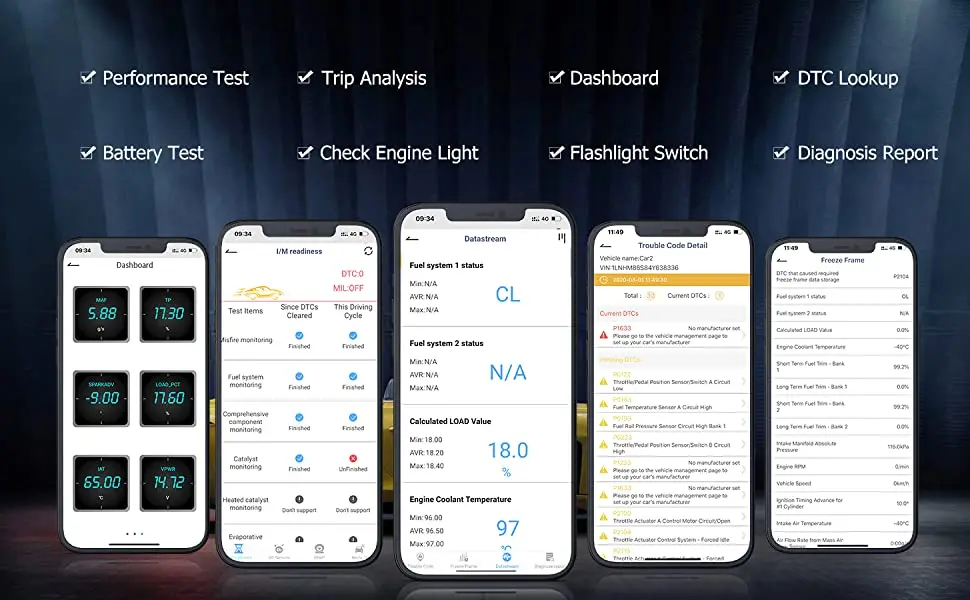
✔️I/M Readiness Test: The purpose of the readiness monitors is to test the emission control systems of the vehicle itself. The monitors are also known as emission monitors. Determine if your vehicle is ready for a smog test.
✔️On-Board Monitor Test: The on-board diagnostic system consists of a computer that monitors the emission system and major engine components. It allows you to read the results of the on-board diagnostic monitoring and test specific components/systems.
✔️O2 Sensor Test: Allows you to retrieve and view the O2 Sensor Monitor Test result for the last test performed from the vehicle's on-board computer.
✔️Vehicle Information: This displays information such as VIN (Vehicle Identification Number), CID (Calibration ID), and CVN (Calibration Verification Number).
✔️Live Data Stream: Reads abundant live data stream and freeze frame data to monitor the operating status of the vehicle, including the status of the fuel system, engine coolant temperature, RPM and various sensor parameters.
✔️DTC Lookup: The device has a built-in, up-to-date OBD-II DTC library. After you enter the fault code and select the car make, the definition and possible causes are displayed so you know what the problem is and may be able to fix it yourself.

Special features you should know.
�� Customized Dashboard:
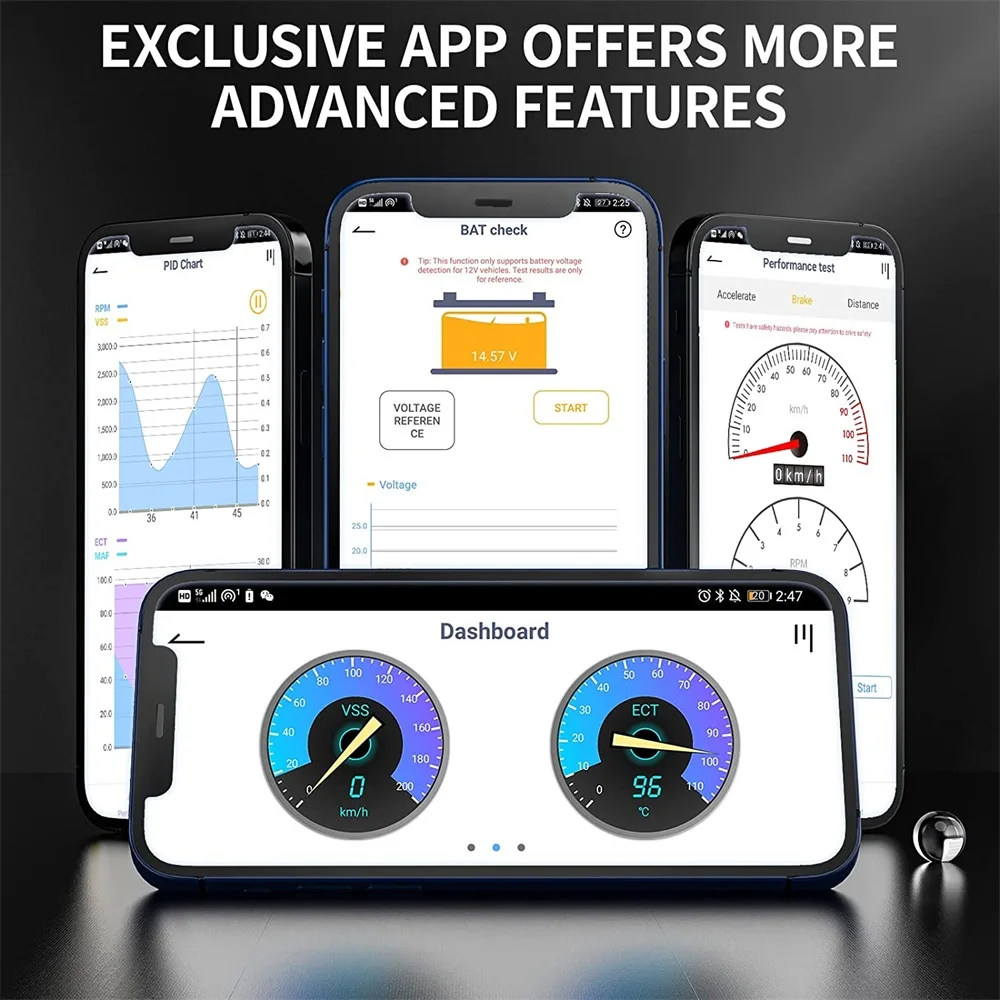
You can view various types of live data, including RPM, VSS, ECT, MAF, TP, LOAD-PCT, SPARKADV, IAT, VPWR, engine-related data streams, etc, which inform you about the operating status of your vehicle. Also, you can customise the dashboard as per your requirement.
�� Performance Test:
Vehicle performance testing plays an important role in driving safety. This scanner supports acceleration, braking and sprinting tests, displays the duration of the test and the changes in speed and RPM in the dashboard. A PID chart is available, including the corresponding values RPM, VSS, ECT, MAF, etc. The test report is automatically generated when the tests are completed, you can view it at any time.
�� Trip Management:
BD200 OBD2 scanner is able to provide detailed numerical analysis for each trip. You can read the coolant temperature and speed in real time on the dashboard and record the driving status, including time, distance, highest and lowest coolant temperature, highest and average speed, highest RPM, number of passing and fast braking, etc.
�� Battery Voltage Check:
The obd2 scanner is able to determine the condition of the battery of 12-volt vehicles. It shows the change in starting voltage over a period of time in graphical form and also gives you the voltage when the engine is off, as well as the minimum and maximum voltage.
�� Safe Driving Alarm:
This feature allows you to set an alarm for speed, water temperature, and driver fatigue time to drive safely. Once the actual data exceeds the values you set, the app will immediately send a voice alert.
How do I connect my iPhone or Android smartphone to a wireless OBD2 scanner?
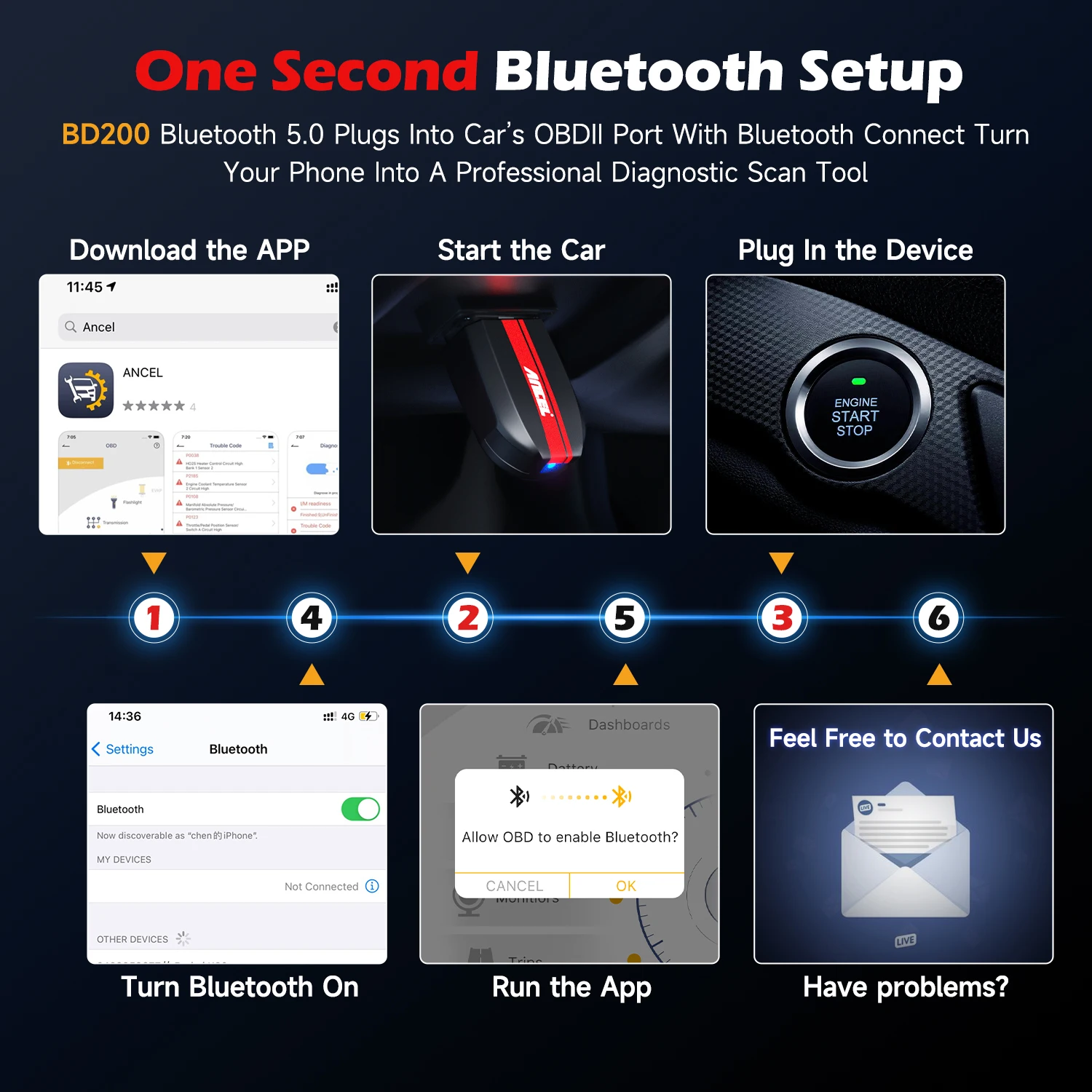
1. download the ANCEL OBD2 app from Google Play or Apple Store in minutes to your phone and register your account.
2. connect the BD200 scanner to your vehicle's OBD2 port, which is usually located under the dashboard on the driver's side.
3. turn on your car.
4. use the app to scan your car for fault codes.
Products Display
●Connection:Bluetooth 5.0
●Support Device: Compatible with iPhone, iPad and Android
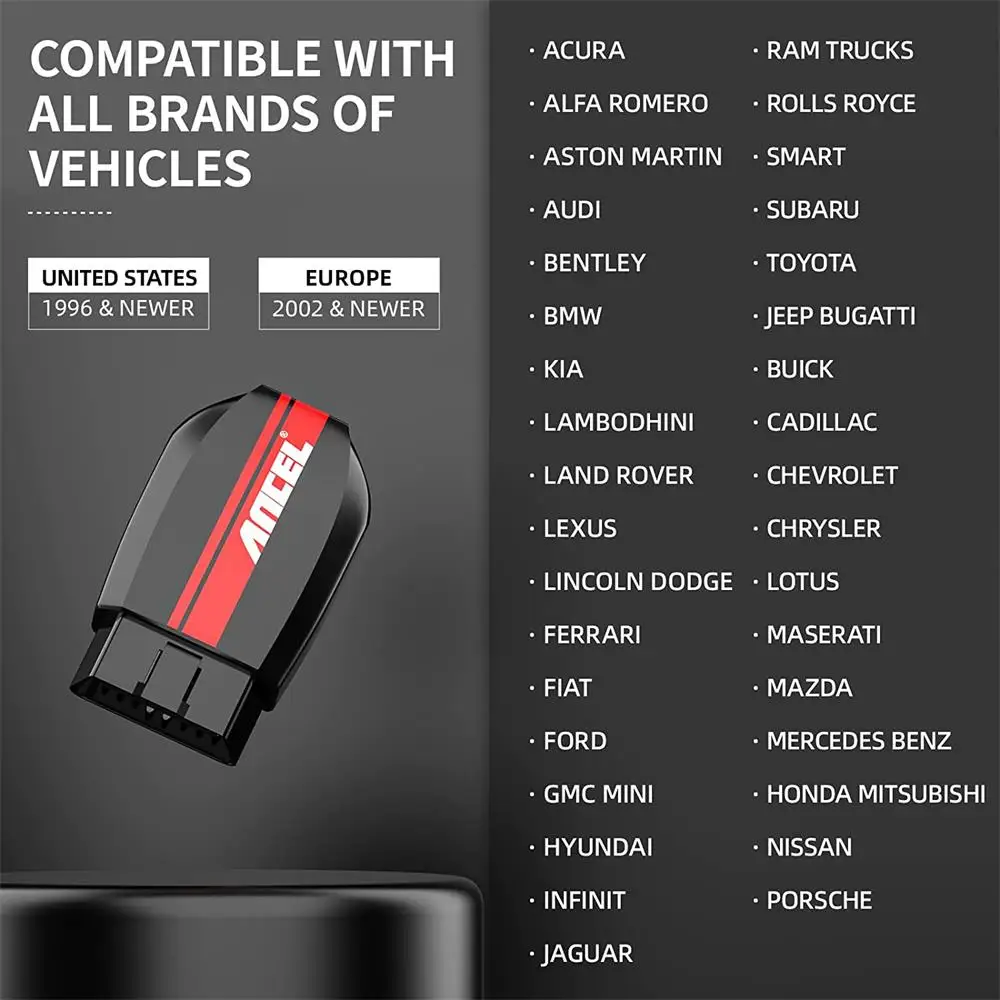
●OBDII Protocol:ISO9141, KWP2000, J1850 PWM, J1850 VPW and CAN
●Free Update:Lifetime
FAQs:
Q1: What is an OBD2 scanner?
An OBD2 scanner, also known as a vehicle scanner or check engine light scanner, is a device that plugs into your vehicle's OBD2 (onboard diagnostics) port and tells you what's wrong with your car. Combined with an OBD2 app, you can use the BD200 to read the code that triggers your check engine light and understand the problem so you can further diagnose and fix the issue or visit a repair shop with clear, accurate information.
Q2:Where is the OBD2 port located?
The OBD2 port on your vehicle is usually located under the dashboard behind the steering wheel or under a panel below the handbrake in the center console.
Q3: Can the BD200 scanner really tell me what's wrong with my car?
Absolutely. As long as your car is compatible, the BD200 can instantly tell you the meaning of more than 10,000 codes that your check engine light shows you. It only takes a few minutes to install, and once it's set up, you'll have up-to-date information about your car at your fingertips on your smartphone that you can use to appear more informed, knowledgeable, and confident at the shop so you do not get ripped off or have to pay for repairs you do not need.
Q4: Is the ANCEL OBD2 app easy to use?
Many of the car scanner apps on the market today are designed for the ordinary motorist and are extremely user friendly. The BD200 scanner with a free OBD2 app is generally easier to use than any handheld scanner and offers more support. No car knowledge required.
Q5: Does the device support a multilingual user interface?
Yes. The BD200 supports English, German, Spanish, Finnish, French, Italian, Dutch, Portuguese, Chinese and more.


On Jan 9, 2024 at 04:36:48 PST, seller added the following information:
Shipping Overview:
• Shipping: Standard Domestic Shipping within the United States charges first item USD 6.99 and additional item USD 3.0 each. Standard International Shipping from United Kingdom, Germany, Italian and Japan to the United States charges first item USD 11.99 and additional item USD 4.0 each.
• Import Duty: Everymarket collects applicable duties and taxes on goods imported into the U.S. at checkout, it's calculated based on the goods value multiply by the rate. For United Kingdom and China goods is 10%, Germany, Italian and Japan goods is 15%. We are committed to making your U.S. shopping experience simple and transparent. The method of delivery—either Delivered Duty Paid (DDP) or Delivered Duty Unpaid (DDU)—depends on whether duties and taxes are collected at the time of your purchase.
• Order Processing: Please allow 1-2 business days for order processing and preparation before shipment.
• Domestic Shipping: Orders within the U.S. are shipped via USPS or FedEx, depending on the origin of the product. Average transit times to the United States is 3 - 7 Business days and average transit times to International is 7 - 14 Business days
• International Shipping: Currently, we only ship within the USA.
• Tracking Information: Every order is trackable. You will receive a tracking number once your order has been shipped. Products may be shipped from various global fulfillment centers.
Shipping Delays:
Please note that shipping times may vary due to factors beyond our control, such as weather conditions, natural disasters, or peak holiday periods. While we strive to ensure timely delivery, the exact arrival time cannot be guaranteed and is managed by the shipping carrier.
Shipping Options:
-
Standard Delivery: Most orders are shipped within 3-7 business days. Larger items may utilize LTL shipping for safe handling.
-
Handling Time: We handle shipments on business days (Monday - Friday), with a preparation time of 1-2 days.
-
Additional Charges: Some items require additional shipping charges due to their size, weight, or special handling. These charges are specified on the product pages and are not eligible for shipping discounts.
-
Exclusions: Gift cards, packaging, taxes, and prior purchases do not count toward the minimum purchase requirement for free shipping. This offer is valid only for shipments to U.S. addresses, including Puerto Rico.
Delivery Details:
-
Estimates: Standard shipping within the US typically takes 3-7 business days. These are estimates and not guarantees.
-
Shipping Restrictions: We ship to all 50 states, Washington, DC, U.S. territories, and APO/FPO/DPO addresses. Shipping options vary based on the delivery address.
-
Remote Areas: Shipments to remote areas may incur additional charges or require pickup from a nearby shipping partner’s location.
Shipping Confirmation:
You will receive a shipping confirmation email with a tracking number as soon as your order is dispatched. If you do not receive this email immediately, please be assured that your items will arrive within the estimated delivery window provided at checkout.
Order Modifications:
If you need to cancel or modify your order, please contact our customer support immediately.
Issues with Delivery:
If your order shows as delivered but you have not received it, please contact the shipping carrier directly to resolve the issue. For persistent problems, contact our customer service at cs@everymarket.com.
Customer Support:
Our team is available 24/7 to assist you with any questions or concerns regarding your order. We are committed to ensuring a smooth shopping experience.
Return & Refund Policy Overview
Please review our return and refund policies below to ensure a smooth transaction process.
Return Policy
-
Duration: You have 30 days from receiving your item to initiate a return.
-
Condition: Items must be unworn, unwashed, with original tags and packaging intact.
-
Shipping Costs: Please contact us to initiate your return, we'll offer return label for free. Otherwise we are not responsible for the return shipping costs of the items.
-
Packaging: Ensure returned items are well-packaged to avoid damage during transit.
-
Tracking: Use a trackable and insured shipping method as we are not liable for items lost or damaged on return.
-
Initiating a Return: Contact us at cs@everymarket.com to start your return. We will provide a return shipping label and instructions upon approval. Returns without prior approval will not be accepted.
How to Return
-
Method: Returns must be sent back by mail to the address provided in the return instructions.
Return Label
-
Please contact us to get return labels.
Product Conditions for Return
-
Eligible Products: Returns are only accepted for items in new condition.
Nonreturnable Items
Certain items are not eligible for return:
-
Electronic devices after 30 days (e.g., computers, laptops, Kindles)
-
Gift cards, prepaid game cards
-
Perishable goods, live insects, some jewelry, some health and personal care items
-
Customized or personalized products
-
Items with special shipping restrictions
Refund Policy
-
Window: Eligible products may be returned within 30 days of delivery for a refund.
-
Refund Method: Refunds are processed to the original payment method or as store credit for items purchased with gift cards.
-
Processing Time: Refunds are processed within 3-5 business days after we receive the return; please allow additional time for shipping and bank processing.
Claims
Inspect your order upon arrival and report any defects, damages, or incorrect items immediately to allow us to address the issue. For claims, contact our support team with details of the issue.
Exchange Policy
For the quickest service, return your original item and place a new order for the desired product once your return is accepted.
Return Address
EveryMarket Customer Service 2101 E Terra Ln, O'Fallon, MO 63366
Customer Support
Available 24/7 for any questions or assistance needed:
-
Phone: +1 (800) 660-3783
-
Email: cs@everymarket.com
Supports 10 OBDII Test Modes
(Note that the OBDII system is designed as an emissions program, not a diagnostic system.)
What Could Cause the Check Engine Light to Turn On?
The check engine light can come on for many reasons. For example, oxygen sensor failure, loose fuel cap, catalytic converter failure, ignition coil issues, bad spark plug wires, vacuum leak, ect.
✔️Read Codes and Clear Codes: Read the fault code within 3 seconds and clear the pending fault code, and turn off the engine light.
✔️Evap System Test: Allows you to perform a leak test for the vehicle's EVAP system. Prevent vaporized gasoline vapors from escaping the vehicle's fuel tank into the atmosphere.
✔️Freeze Frame: Get a snapshot of the vehicle when a freeze frame code has been saved.
✔️I/M Readiness Test: The purpose of the readiness monitors is to test the emission control systems of the vehicle itself. The monitors are also known as emission monitors. Determine if your vehicle is ready for a smog test.
✔️On-Board Monitor Test: The on-board diagnostic system consists of a computer that monitors the emission system and major engine components. It allows you to read the results of the on-board diagnostic monitoring and test specific components/systems.
✔️O2 Sensor Test: Allows you to retrieve and view the O2 Sensor Monitor Test result for the last test performed from the vehicle's on-board computer.
✔️Vehicle Information: This displays information such as VIN (Vehicle Identification Number), CID (Calibration ID), and CVN (Calibration Verification Number).
✔️Live Data Stream: Reads abundant live data stream and freeze frame data to monitor the operating status of the vehicle, including the status of the fuel system, engine coolant temperature, RPM and various sensor parameters.
✔️DTC Lookup: The device has a built-in, up-to-date OBD-II DTC library. After you enter the fault code and select the car make, the definition and possible causes are displayed so you know what the problem is and may be able to fix it yourself.
Special features you should know.
�� Customized Dashboard:
You can view various types of live data, including RPM, VSS, ECT, MAF, TP, LOAD-PCT, SPARKADV, IAT, VPWR, engine-related data streams, etc, which inform you about the operating status of your vehicle. Also, you can customise the dashboard as per your requirement.
�� Performance Test:
Vehicle performance testing plays an important role in driving safety. This scanner supports acceleration, braking and sprinting tests, displays the duration of the test and the changes in speed and RPM in the dashboard. A PID chart is available, including the corresponding values RPM, VSS, ECT, MAF, etc. The test report is automatically generated when the tests are completed, you can view it at any time.
�� Trip Management:
BD200 OBD2 scanner is able to provide detailed numerical analysis for each trip. You can read the coolant temperature and speed in real time on the dashboard and record the driving status, including time, distance, highest and lowest coolant temperature, highest and average speed, highest RPM, number of passing and fast braking, etc.
�� Battery Voltage Check:
The obd2 scanner is able to determine the condition of the battery of 12-volt vehicles. It shows the change in starting voltage over a period of time in graphical form and also gives you the voltage when the engine is off, as well as the minimum and maximum voltage.
�� Safe Driving Alarm:
This feature allows you to set an alarm for speed, water temperature, and driver fatigue time to drive safely. Once the actual data exceeds the values you set, the app will immediately send a voice alert.
How do I connect my iPhone or Android smartphone to a wireless OBD2 scanner?
1. download the ANCEL OBD2 app from Google Play or Apple Store in minutes to your phone and register your account.
2. connect the BD200 scanner to your vehicle's OBD2 port, which is usually located under the dashboard on the driver's side.
3. turn on your car.
4. use the app to scan your car for fault codes.
Products Display
●Connection:Bluetooth 5.0
●Support Device: Compatible with iPhone, iPad and Android
●OBDII Protocol:ISO9141, KWP2000, J1850 PWM, J1850 VPW and CAN
●Free Update:Lifetime
FAQs:
Q1: What is an OBD2 scanner?
An OBD2 scanner, also known as a vehicle scanner or check engine light scanner, is a device that plugs into your vehicle's OBD2 (onboard diagnostics) port and tells you what's wrong with your car. Combined with an OBD2 app, you can use the BD200 to read the code that triggers your check engine light and understand the problem so you can further diagnose and fix the issue or visit a repair shop with clear, accurate information.
Q2:Where is the OBD2 port located?
The OBD2 port on your vehicle is usually located under the dashboard behind the steering wheel or under a panel below the handbrake in the center console.
Q3: Can the BD200 scanner really tell me what's wrong with my car?
Absolutely. As long as your car is compatible, the BD200 can instantly tell you the meaning of more than 10,000 codes that your check engine light shows you. It only takes a few minutes to install, and once it's set up, you'll have up-to-date information about your car at your fingertips on your smartphone that you can use to appear more informed, knowledgeable, and confident at the shop so you do not get ripped off or have to pay for repairs you do not need.
Q4: Is the ANCEL OBD2 app easy to use?
Many of the car scanner apps on the market today are designed for the ordinary motorist and are extremely user friendly. The BD200 scanner with a free OBD2 app is generally easier to use than any handheld scanner and offers more support. No car knowledge required.
Q5: Does the device support a multilingual user interface?
Yes. The BD200 supports English, German, Spanish, Finnish, French, Italian, Dutch, Portuguese, Chinese and more.
On Jan 9, 2024 at 04:36:48 PST, seller added the following information:
Shipping Overview:
• Shipping: Standard Domestic Shipping within the United States charges first item USD 6.99 and additional item USD 3.0 each. Standard International Shipping from United Kingdom, Germany, Italian and Japan to the United States charges first item USD 11.99 and additional item USD 4.0 each.
• Import Duty: Everymarket collects applicable duties and taxes on goods imported into the U.S. at checkout, it's calculated based on the goods value multiply by the rate. For United Kingdom and China goods is 10%, Germany, Italian and Japan goods is 15%. We are committed to making your U.S. shopping experience simple and transparent. The method of delivery—either Delivered Duty Paid (DDP) or Delivered Duty Unpaid (DDU)—depends on whether duties and taxes are collected at the time of your purchase.
• Order Processing: Please allow 1-2 business days for order processing and preparation before shipment.
• Domestic Shipping: Orders within the U.S. are shipped via USPS or FedEx, depending on the origin of the product. Average transit times to the United States is 3 - 7 Business days and average transit times to International is 7 - 14 Business days
• International Shipping: Currently, we only ship within the USA.
• Tracking Information: Every order is trackable. You will receive a tracking number once your order has been shipped. Products may be shipped from various global fulfillment centers.
Shipping Delays:
Please note that shipping times may vary due to factors beyond our control, such as weather conditions, natural disasters, or peak holiday periods. While we strive to ensure timely delivery, the exact arrival time cannot be guaranteed and is managed by the shipping carrier.
Shipping Options:
-
Standard Delivery: Most orders are shipped within 3-7 business days. Larger items may utilize LTL shipping for safe handling.
-
Handling Time: We handle shipments on business days (Monday - Friday), with a preparation time of 1-2 days.
-
Additional Charges: Some items require additional shipping charges due to their size, weight, or special handling. These charges are specified on the product pages and are not eligible for shipping discounts.
-
Exclusions: Gift cards, packaging, taxes, and prior purchases do not count toward the minimum purchase requirement for free shipping. This offer is valid only for shipments to U.S. addresses, including Puerto Rico.
Delivery Details:
-
Estimates: Standard shipping within the US typically takes 3-7 business days. These are estimates and not guarantees.
-
Shipping Restrictions: We ship to all 50 states, Washington, DC, U.S. territories, and APO/FPO/DPO addresses. Shipping options vary based on the delivery address.
-
Remote Areas: Shipments to remote areas may incur additional charges or require pickup from a nearby shipping partner’s location.
Shipping Confirmation:
You will receive a shipping confirmation email with a tracking number as soon as your order is dispatched. If you do not receive this email immediately, please be assured that your items will arrive within the estimated delivery window provided at checkout.
Order Modifications:
If you need to cancel or modify your order, please contact our customer support immediately.
Issues with Delivery:
If your order shows as delivered but you have not received it, please contact the shipping carrier directly to resolve the issue. For persistent problems, contact our customer service at cs@everymarket.com.
Customer Support:
Our team is available 24/7 to assist you with any questions or concerns regarding your order. We are committed to ensuring a smooth shopping experience.
Return & Refund Policy Overview
Please review our return and refund policies below to ensure a smooth transaction process.
Return Policy
-
Duration: You have 30 days from receiving your item to initiate a return.
-
Condition: Items must be unworn, unwashed, with original tags and packaging intact.
-
Shipping Costs: Please contact us to initiate your return, we'll offer return label for free. Otherwise we are not responsible for the return shipping costs of the items.
-
Packaging: Ensure returned items are well-packaged to avoid damage during transit.
-
Tracking: Use a trackable and insured shipping method as we are not liable for items lost or damaged on return.
-
Initiating a Return: Contact us at cs@everymarket.com to start your return. We will provide a return shipping label and instructions upon approval. Returns without prior approval will not be accepted.
How to Return
-
Method: Returns must be sent back by mail to the address provided in the return instructions.
Return Label
-
Please contact us to get return labels.
Product Conditions for Return
-
Eligible Products: Returns are only accepted for items in new condition.
Nonreturnable Items
Certain items are not eligible for return:
-
Electronic devices after 30 days (e.g., computers, laptops, Kindles)
-
Gift cards, prepaid game cards
-
Perishable goods, live insects, some jewelry, some health and personal care items
-
Customized or personalized products
-
Items with special shipping restrictions
Refund Policy
-
Window: Eligible products may be returned within 30 days of delivery for a refund.
-
Refund Method: Refunds are processed to the original payment method or as store credit for items purchased with gift cards.
-
Processing Time: Refunds are processed within 3-5 business days after we receive the return; please allow additional time for shipping and bank processing.
Claims
Inspect your order upon arrival and report any defects, damages, or incorrect items immediately to allow us to address the issue. For claims, contact our support team with details of the issue.
Exchange Policy
For the quickest service, return your original item and place a new order for the desired product once your return is accepted.
Return Address
EveryMarket Customer Service 2101 E Terra Ln, O'Fallon, MO 63366
Customer Support
Available 24/7 for any questions or assistance needed:
-
Phone: +1 (800) 660-3783
-
Email: cs@everymarket.com
Oops!
Sorry, it looks like some products are not available in selected quantity.