







For Subaru All System Bidirectional OBD2 Scanner Diagnostic Tool ABS Bleeding




Do you love your car? Do you want to keep driving it as long as you can?
- There are few things your car will require of you to maintain its longevity - changing your oil, replacing air filters and other general service tasks.
- Many people wonder though, whether those task mentioned is a simple DIY process or has to be done by an expert technician.
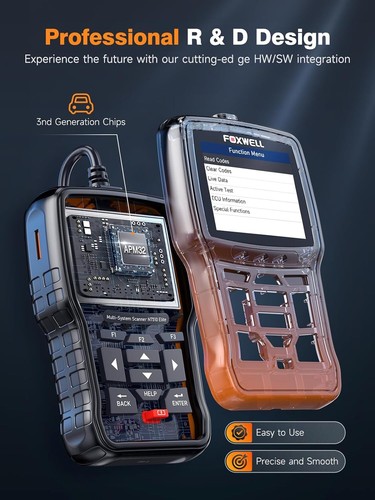
- We say: you can definitely handle the replacement on your own via our professional FOXWELL NT510 Elite diagnostic scanner tool!
- Except for auto repair shop, here is another choice for you to learn about your car condition deeply.
Why is The FOXWELL NT510 Elite Diagnostic Scanner Tool is So Powerful And Reliable?
- Work on Subaru from 1996 to Present. Compatible with global OBDI / OBDII / EOBD. (20PIN needs to purchase additional adapter)
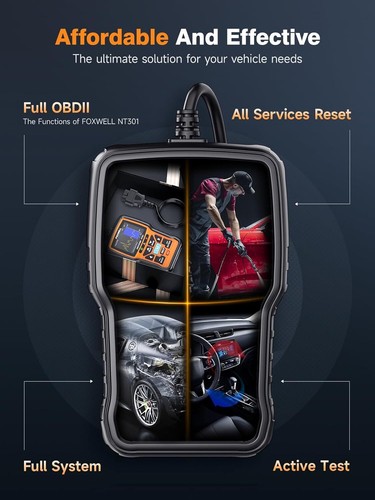
- Full System Diagnostic+ Bidirectional Control + Active Test + Key Programming + 31 Reset Service Functions + Calibration + Adaptation + Matching + Initialization + The vast majority of Subaru Cars supported.
- OE-LEVEL Advanced Automotive Diagnostic Tool .
- FOXWELL NT510 elite Bidirectional scanner has OE-Level functions.
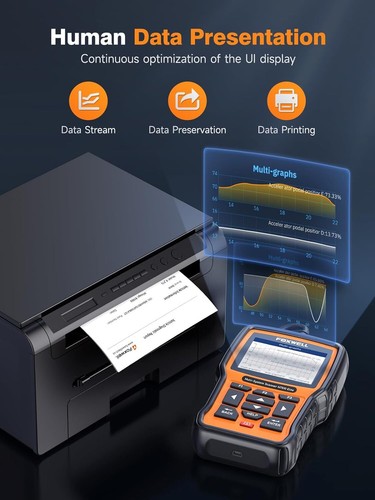
- Graphic Data Display: display live data in text, graph & analog for easy and intuitive data review.
- S-mog Test: Pass the annual inspection with ease
- 2.8'' TFT Color Screen Combined with the Button-navigation Design:Easier operate in the greasy workplace.
- Health Report---Save, share, and print the overall inspection report for further diagnostic analysis.
- Lifetime F-ree Update---Use more models and features by updating
Active Tester( Bi-Directional Control ) :
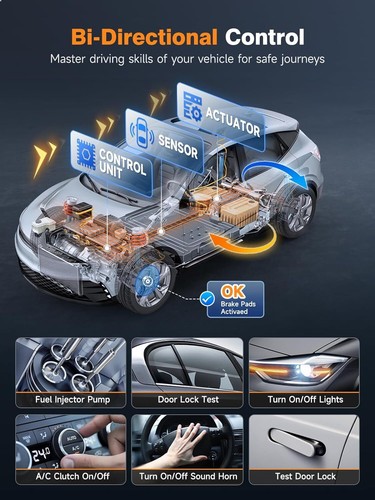
Bi-Directional Control capability and is capable of performing Active Tests to access vehicle-specific subsystems and component tests. The tester outputs commands to the ECU to drive the actuators in order to determine the integrity of the system or parts by reading the ECU data, or by monitoring the operation of the actuators .For example , NT510 Elite have the ability to actuate relays, injectors, coils, or perform system tests, etc. Also it will actuate solenoids valve and actuators for active testing to identify the error easily moreover. The bidirectional functions are quite extensive. even open an e.g.r. valve and seeing the difference in idle response and oxygen sensor voltage. Please note: Active tests are NOT universal for all vehicles, check compatibility with VIN number before purchase. Active tests vary depending on the manufacturer, year, and model, and only the available tests display in the menu.

31+ Reset Function :
1. Steering Angle Reset
Reset the steering angle to zero to keep the car running straight.
2. Injector Coding
Write the new injector code into the car system for the correct cylinder injection quantity.
3. IMMO
Disable any lost keys and add new keys. **ONLY for cars with an easy IMMO system.
4. DPF Regeneration
Especially works for D-P-F system with D-P-F regeneration, D-P-F component replacement teach-in and D-P-F teach-in after replacing the engine control unit.
5. A/C relearn
The vehicle air conditioner replaces the electronic control unit, replaces the actuator or the memory of the electronic control unit memory is lost, and requires air conditioning initialization learning.
6. ABS Bleeding
Help exhaust the air after repair the ABS pump system.
7. AdBlue Reset
Reset urea after the diesel exhaust treatment fluid is replaced or filled up.
8. Throttle Matching
Initialize the throttle actuators to the default state.
9. TPMS Reset
Makes sense in displaying sensor IDs from the vehicle's ECU, inputting TPMS sensor replacement IDs and testing sensors.
10. Tire Reset
Set the size parameters of the modified or replaced tire.
11. AFS Headlamp Reset
Initialize the adaptive headlamp system.
12. Sunroof Initialization
Initialize the sunroof when locked off or closed.
13. Battery Reset
Register the battery after replacement.
14. Seat Calibration
Calibrate the memory in replaced or repaired seats.
15. Oil Reset
Allows you to perform reset for a new calculation of Engine Oil Life system once changed the oil.
16. A/F Reset:
Set or learn Air/Fuel ratio parameters.
17. GEARBOX LEARN
Help complete the gearbox self-learning to improve gear shifting quality.
18. Transport Mode
Deactivate the transport mode.
19. Windows Calibration
Perform door window matching to recover ECU initial memory.
20. Language Change
Change vehicle system language.
21. Suspension Reset
Adjust the vehicle body height sensor for level calibration.
22. NOx Sensor Reset
Reset catalytic converter learned value stored in ECU.
23. Stop/Start Reset
Set up the automatic start-stop function in ECU.
24. Coolant Bleeding
Activate the electronic water pump.
25. Brake Reset
It is important in the maintenance of electronic braking system's safety and efficiency.
26.Gear Learning
The scan tool monitors certain camshaft position sensors signals to determine if all conditions are met to continue with the procedure for Engine running.
..........

All Systems Full Diagnostic Function :
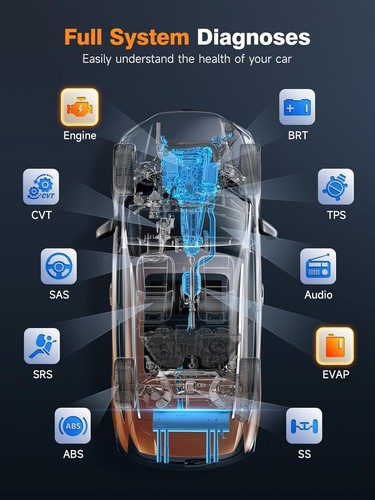
All Systems Including : ABS System, Engine System, SAS System, TPMS System, IMMO System, Battery System, Oil Service System, SRS System, DPF System,Air Conditioning System,Transmission System..........
Full Diagnostic Function :
--read fault codes: read and decode the DTCs to identify where the fault location is;
--clear fault codes: erase the DTCs to turn off the MIL after repairs;
--retrieve ecu information: allows you to retrieve vehicle information;
--Graph live data stream: view the dynamic data stream to determine vehicle condition
--Freeze Frame: it will record the information of the vehicle running status at the moment when the fault occurs to confirm the fault.
--Vehicle information: such as Vehicle Identification Number (VIN), Calibration Mark (CALID) and Calibration Verification Number (CVN) .
--Online & Offline ECU Coding: generally used for cars after replacing second-hand parts, then it can work .
--Active Tester( Bi-Directional Control ): to test whether the actuators of each system are normal, for analysis
--Special Function: more than 31+ reset function , like airbag reset, AF Adjustment, DPF reset.........

Full 10 OBD2 Function :
This scanner supports all 10 test modes for OBD-II cars which are great for daily repair work. The table below describes the purpose of each mode of operation:
1. Reading Codes: Show the detailed description of the Diagnostic Trouble Code (DTCs)
2. Erasing Codes & Reset: Turns off Check Engine Light (MIL), clears codes and resets monitors.
3. Data Stream: Reads and displays live ECU/PCM data stream, plotting functions graphically and stores freeze frame data.
4. I/M Readiness Status: Shows whether the various emissions-related systems on the vehicle are operating properly and are ready for inspection and maintenance testing.
5. Read Live Data Stream: Show the information of continuous data stream from a vehicle in live graphic (waveform) display.
6. View Freeze Frame Data: Check the certain vehicle conditions which are recorded by the on-board computer at the time the emission-related fault occurs.
7.O2 Sensor Test: Allows retrieval and viewing of O2 sensor monitor test results for the most recently performed tests from the vehicle’s on-board computer.
8.On-Board Monitor Test: Retrieves and displays test results for emission-related powertrain components and systems.
9.Read Vehicle Information: Display the information such as VIN (Vehicle Identification Number), CID (Calibration ID) and CVN (Calibration verification number), etc.
10.Component Test: Certain vehicle components can be actuated by commands sent from the scanner to test their operability.
Full OBD II Protocols:
1. SAE J1850 PWM (41.6 Kbaud)
2. SAE J1850 VPW (10.4 Kbaud)
3. ISO 9141-2 (5 baud init, 10.4 Kbaud)
4. ISO14230-4 KWP (5 baud init, 10.4 Kbaud)
5. ISO14230-4 KWP (fast init, 10.4 Kbaud)
6. ISO15765-4 CAN (11bit ID, 500 Kbaud)
7. ISO15765-4 CAN (29bit ID, 500 Kbaud)
8. ISO15765-4 CAN (11bit ID, 250 Kbaud)
9. ISO15765-4 CAN (29bit ID, 250 Kbaud)

FOXWELL NT510 Supports 21 Languages : vas
English, French, Spanish, German, Italian, Russian, Portuguese, Korean, Japanese, Polish, Traditional Chinese etc.
The MALL function
FOXWELL NT510 supports for AUDI , for BENZ , for BMW , for GM , It also for other brands too , like for Toyota , for vw , for Ford etc , those brands need subscribe in MAll button , it takes USD40/Brands , you can choose the one you want to subscribe !!!
The Other Functions :
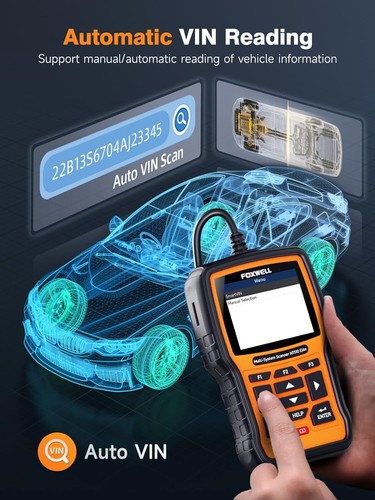
1. Auto VIN Scan ( Smart Diagnosis ) :
Adopts Auto-VIN technology that will automatically recognize vehicle information which you get the vehicle's make,model and year information more easily
2. Maintain Information ( powerful & useful Function ) :
This function has a how-to for some special functions, which is about examples of operating special functions for real vehicles to help you learn the operation of the special functions; It also has Online Coding Help that will show you the steps for this function; And has Channel Information, it will show you how to do basic settings to make the channel return to its original normal value. All of this maintenance information can assist you to better resolving the vehicle's issue
3. DTC Library :
Allows you to retrieve the definition of the diagnostic trouble code from the abundant DTC database.
4. Display Real-Time Battery Voltage
If the charging system is not working properly, the battery will not get the proper charging voltage and it could go flat. This OBDII scanner can display the instantaneous voltage across the battery terminals in a graphical way. This helps you to get early warnings for possible battery and the charging system problems
5. Print Diagnostic Report
Parameter :
Brand: FOXWELL
Model: NT510 Elite
Color: black + orange
Display: 2.8" TFT color screen
External Power: 8-18 Volts powered by vehicle battery
Working Temperature: 0°Cto 60°C
Storage Temperature: -20°C to 70°C
USB Version: USB 2.0
Product Dimension: 14.5 * 9.4 * 3.5cm / 5.7 * 3.7 * 1.6in
Package Size: 22 * 17 * 8. 5cm / 8.7 * 6.7 * 2in
Package Weight: 670g / 23.6oz

Packing List:
1. NT510 Elite Main Unit
2. Diagnostic Cable
3. Memory card
4. Quick Start Guide
5. User's Manual

We accept all common forms of payment such as Credit cards、Debit card、Google Pay ect.
Payment should be made within 7 days after bidding ends.
Otherwise a Unpaid Item case will be opened to you.
Please include your special requests in eBay note if there is any.
Delivery time varies from 2 to 5 business days.
Please make sure it is correct and include phone number for delivery.
Please include your special requests in eBay note if there is any.
We are authorize distributor, our all items are 100% original and Our devices have warranty,
5 Year free repair for the devices.
In case an item arrives faulty, please contact us as soon as possible and keep it unused.
We will instruct you on how to return and get refund or replacement.
If the item has been used, we have the right to decline your claim.
Items should be returned on buyers' cost for repair or replacement.
We are specialized dealer of On-Board Car Diagnostic tools and automotive electronics
for more than 15 years.
We are authorized first class distributor of Launch, Foxwell, Autek, Ancel, Innova, Autophix, Thinkcar, Kzyee brands,
and more brands will be show in our store in near future.
What Do We Have?
We have office and warehouse in US to ensure fast shipment and after-sale service.
We have more than 1000 employees devoting to customer satisfaction.
1:If youhave any problem about the goods, please contact us before leaving Neutral/Negative feedback.We promise to help you solve it asap, and make you feel satisfactory absolutely.
2: our business time:M-F: 9:30AM - 18:00PM BST (Beijing Standard Time)
3:Please leave us Positive Feedback and 5-stars★★★★★after you received our package you are satisfied with it. as you know, every seller works hard for the positive feedback. We will do the same as soon as we can too.

Shipping Overview:
• Shipping: Standard Domestic Shipping within the United States charges first item USD 6.99 and additional item USD 3.0 each. Standard International Shipping from United Kingdom, Germany, Italian and Japan to the United States charges first item USD 11.99 and additional item USD 4.0 each.
• Import Duty: Everymarket collects applicable duties and taxes on goods imported into the U.S. at checkout, it's calculated based on the goods value multiply by the rate. For United Kingdom and China goods is 10%, Germany, Italian and Japan goods is 15%. We are committed to making your U.S. shopping experience simple and transparent. The method of delivery—either Delivered Duty Paid (DDP) or Delivered Duty Unpaid (DDU)—depends on whether duties and taxes are collected at the time of your purchase.
• Order Processing: Please allow 1-2 business days for order processing and preparation before shipment.
• Domestic Shipping: Orders within the U.S. are shipped via USPS or FedEx, depending on the origin of the product. Average transit times to the United States is 3 - 7 Business days and average transit times to International is 7 - 14 Business days
• International Shipping: Currently, we only ship within the USA.
• Tracking Information: Every order is trackable. You will receive a tracking number once your order has been shipped. Products may be shipped from various global fulfillment centers.
Shipping Delays:
Please note that shipping times may vary due to factors beyond our control, such as weather conditions, natural disasters, or peak holiday periods. While we strive to ensure timely delivery, the exact arrival time cannot be guaranteed and is managed by the shipping carrier.
Shipping Options:
-
Standard Delivery: Most orders are shipped within 3-7 business days. Larger items may utilize LTL shipping for safe handling.
-
Handling Time: We handle shipments on business days (Monday - Friday), with a preparation time of 1-2 days.
-
Additional Charges: Some items require additional shipping charges due to their size, weight, or special handling. These charges are specified on the product pages and are not eligible for shipping discounts.
-
Exclusions: Gift cards, packaging, taxes, and prior purchases do not count toward the minimum purchase requirement for free shipping. This offer is valid only for shipments to U.S. addresses, including Puerto Rico.
Delivery Details:
-
Estimates: Standard shipping within the US typically takes 3-7 business days. These are estimates and not guarantees.
-
Shipping Restrictions: We ship to all 50 states, Washington, DC, U.S. territories, and APO/FPO/DPO addresses. Shipping options vary based on the delivery address.
-
Remote Areas: Shipments to remote areas may incur additional charges or require pickup from a nearby shipping partner’s location.
Shipping Confirmation:
You will receive a shipping confirmation email with a tracking number as soon as your order is dispatched. If you do not receive this email immediately, please be assured that your items will arrive within the estimated delivery window provided at checkout.
Order Modifications:
If you need to cancel or modify your order, please contact our customer support immediately.
Issues with Delivery:
If your order shows as delivered but you have not received it, please contact the shipping carrier directly to resolve the issue. For persistent problems, contact our customer service at cs@everymarket.com.
Customer Support:
Our team is available 24/7 to assist you with any questions or concerns regarding your order. We are committed to ensuring a smooth shopping experience.
Return & Refund Policy Overview
Please review our return and refund policies below to ensure a smooth transaction process.
Return Policy
-
Duration: You have 30 days from receiving your item to initiate a return.
-
Condition: Items must be unworn, unwashed, with original tags and packaging intact.
-
Shipping Costs: Please contact us to initiate your return, we'll offer return label for free. Otherwise we are not responsible for the return shipping costs of the items.
-
Packaging: Ensure returned items are well-packaged to avoid damage during transit.
-
Tracking: Use a trackable and insured shipping method as we are not liable for items lost or damaged on return.
-
Initiating a Return: Contact us at cs@everymarket.com to start your return. We will provide a return shipping label and instructions upon approval. Returns without prior approval will not be accepted.
How to Return
-
Method: Returns must be sent back by mail to the address provided in the return instructions.
Return Label
-
Please contact us to get return labels.
Product Conditions for Return
-
Eligible Products: Returns are only accepted for items in new condition.
Nonreturnable Items
Certain items are not eligible for return:
-
Electronic devices after 30 days (e.g., computers, laptops, Kindles)
-
Gift cards, prepaid game cards
-
Perishable goods, live insects, some jewelry, some health and personal care items
-
Customized or personalized products
-
Items with special shipping restrictions
Refund Policy
-
Window: Eligible products may be returned within 30 days of delivery for a refund.
-
Refund Method: Refunds are processed to the original payment method or as store credit for items purchased with gift cards.
-
Processing Time: Refunds are processed within 3-5 business days after we receive the return; please allow additional time for shipping and bank processing.
Claims
Inspect your order upon arrival and report any defects, damages, or incorrect items immediately to allow us to address the issue. For claims, contact our support team with details of the issue.
Exchange Policy
For the quickest service, return your original item and place a new order for the desired product once your return is accepted.
Return Address
EveryMarket Customer Service 2101 E Terra Ln, O'Fallon, MO 63366
Customer Support
Available 24/7 for any questions or assistance needed:
-
Phone: +1 (800) 660-3783
-
Email: cs@everymarket.com
Do you love your car? Do you want to keep driving it as long as you can?
- There are few things your car will require of you to maintain its longevity - changing your oil, replacing air filters and other general service tasks.
- Many people wonder though, whether those task mentioned is a simple DIY process or has to be done by an expert technician.
- We say: you can definitely handle the replacement on your own via our professional FOXWELL NT510 Elite diagnostic scanner tool!
- Except for auto repair shop, here is another choice for you to learn about your car condition deeply.
Why is The FOXWELL NT510 Elite Diagnostic Scanner Tool is So Powerful And Reliable?
- Work on Subaru from 1996 to Present. Compatible with global OBDI / OBDII / EOBD. (20PIN needs to purchase additional adapter)
- Full System Diagnostic+ Bidirectional Control + Active Test + Key Programming + 31 Reset Service Functions + Calibration + Adaptation + Matching + Initialization + The vast majority of Subaru Cars supported.
- OE-LEVEL Advanced Automotive Diagnostic Tool .
- FOXWELL NT510 elite Bidirectional scanner has OE-Level functions.
- Graphic Data Display: display live data in text, graph & analog for easy and intuitive data review.
- S-mog Test: Pass the annual inspection with ease
- 2.8'' TFT Color Screen Combined with the Button-navigation Design:Easier operate in the greasy workplace.
- Health Report---Save, share, and print the overall inspection report for further diagnostic analysis.
- Lifetime F-ree Update---Use more models and features by updating
Active Tester( Bi-Directional Control ) :
Bi-Directional Control capability and is capable of performing Active Tests to access vehicle-specific subsystems and component tests. The tester outputs commands to the ECU to drive the actuators in order to determine the integrity of the system or parts by reading the ECU data, or by monitoring the operation of the actuators .For example , NT510 Elite have the ability to actuate relays, injectors, coils, or perform system tests, etc. Also it will actuate solenoids valve and actuators for active testing to identify the error easily moreover. The bidirectional functions are quite extensive. even open an e.g.r. valve and seeing the difference in idle response and oxygen sensor voltage. Please note: Active tests are NOT universal for all vehicles, check compatibility with VIN number before purchase. Active tests vary depending on the manufacturer, year, and model, and only the available tests display in the menu.
31+ Reset Function :
1. Steering Angle Reset
Reset the steering angle to zero to keep the car running straight.
2. Injector Coding
Write the new injector code into the car system for the correct cylinder injection quantity.
3. IMMO
Disable any lost keys and add new keys. **ONLY for cars with an easy IMMO system.
4. DPF Regeneration
Especially works for D-P-F system with D-P-F regeneration, D-P-F component replacement teach-in and D-P-F teach-in after replacing the engine control unit.
5. A/C relearn
The vehicle air conditioner replaces the electronic control unit, replaces the actuator or the memory of the electronic control unit memory is lost, and requires air conditioning initialization learning.
6. ABS Bleeding
Help exhaust the air after repair the ABS pump system.
7. AdBlue Reset
Reset urea after the diesel exhaust treatment fluid is replaced or filled up.
8. Throttle Matching
Initialize the throttle actuators to the default state.
9. TPMS Reset
Makes sense in displaying sensor IDs from the vehicle's ECU, inputting TPMS sensor replacement IDs and testing sensors.
10. Tire Reset
Set the size parameters of the modified or replaced tire.
11. AFS Headlamp Reset
Initialize the adaptive headlamp system.
12. Sunroof Initialization
Initialize the sunroof when locked off or closed.
13. Battery Reset
Register the battery after replacement.
14. Seat Calibration
Calibrate the memory in replaced or repaired seats.
15. Oil Reset
Allows you to perform reset for a new calculation of Engine Oil Life system once changed the oil.
16. A/F Reset:
Set or learn Air/Fuel ratio parameters.
17. GEARBOX LEARN
Help complete the gearbox self-learning to improve gear shifting quality.
18. Transport Mode
Deactivate the transport mode.
19. Windows Calibration
Perform door window matching to recover ECU initial memory.
20. Language Change
Change vehicle system language.
21. Suspension Reset
Adjust the vehicle body height sensor for level calibration.
22. NOx Sensor Reset
Reset catalytic converter learned value stored in ECU.
23. Stop/Start Reset
Set up the automatic start-stop function in ECU.
24. Coolant Bleeding
Activate the electronic water pump.
25. Brake Reset
It is important in the maintenance of electronic braking system's safety and efficiency.
26.Gear Learning
The scan tool monitors certain camshaft position sensors signals to determine if all conditions are met to continue with the procedure for Engine running.
..........
All Systems Full Diagnostic Function :
All Systems Including : ABS System, Engine System, SAS System, TPMS System, IMMO System, Battery System, Oil Service System, SRS System, DPF System,Air Conditioning System,Transmission System..........
Full Diagnostic Function :
--read fault codes: read and decode the DTCs to identify where the fault location is;
--clear fault codes: erase the DTCs to turn off the MIL after repairs;
--retrieve ecu information: allows you to retrieve vehicle information;
--Graph live data stream: view the dynamic data stream to determine vehicle condition
--Freeze Frame: it will record the information of the vehicle running status at the moment when the fault occurs to confirm the fault.
--Vehicle information: such as Vehicle Identification Number (VIN), Calibration Mark (CALID) and Calibration Verification Number (CVN) .
--Online & Offline ECU Coding: generally used for cars after replacing second-hand parts, then it can work .
--Active Tester( Bi-Directional Control ): to test whether the actuators of each system are normal, for analysis
--Special Function: more than 31+ reset function , like airbag reset, AF Adjustment, DPF reset.........
Full 10 OBD2 Function :
This scanner supports all 10 test modes for OBD-II cars which are great for daily repair work. The table below describes the purpose of each mode of operation:
1. Reading Codes: Show the detailed description of the Diagnostic Trouble Code (DTCs)
2. Erasing Codes & Reset: Turns off Check Engine Light (MIL), clears codes and resets monitors.
3. Data Stream: Reads and displays live ECU/PCM data stream, plotting functions graphically and stores freeze frame data.
4. I/M Readiness Status: Shows whether the various emissions-related systems on the vehicle are operating properly and are ready for inspection and maintenance testing.
5. Read Live Data Stream: Show the information of continuous data stream from a vehicle in live graphic (waveform) display.
6. View Freeze Frame Data: Check the certain vehicle conditions which are recorded by the on-board computer at the time the emission-related fault occurs.
7.O2 Sensor Test: Allows retrieval and viewing of O2 sensor monitor test results for the most recently performed tests from the vehicle’s on-board computer.
8.On-Board Monitor Test: Retrieves and displays test results for emission-related powertrain components and systems.
9.Read Vehicle Information: Display the information such as VIN (Vehicle Identification Number), CID (Calibration ID) and CVN (Calibration verification number), etc.
10.Component Test: Certain vehicle components can be actuated by commands sent from the scanner to test their operability.
Full OBD II Protocols:
1. SAE J1850 PWM (41.6 Kbaud)
2. SAE J1850 VPW (10.4 Kbaud)
3. ISO 9141-2 (5 baud init, 10.4 Kbaud)
4. ISO14230-4 KWP (5 baud init, 10.4 Kbaud)
5. ISO14230-4 KWP (fast init, 10.4 Kbaud)
6. ISO15765-4 CAN (11bit ID, 500 Kbaud)
7. ISO15765-4 CAN (29bit ID, 500 Kbaud)
8. ISO15765-4 CAN (11bit ID, 250 Kbaud)
9. ISO15765-4 CAN (29bit ID, 250 Kbaud)
FOXWELL NT510 Supports 21 Languages : vas
English, French, Spanish, German, Italian, Russian, Portuguese, Korean, Japanese, Polish, Traditional Chinese etc.
The MALL function
FOXWELL NT510 supports for AUDI , for BENZ , for BMW , for GM , It also for other brands too , like for Toyota , for vw , for Ford etc , those brands need subscribe in MAll button , it takes USD40/Brands , you can choose the one you want to subscribe !!!
The Other Functions :
1. Auto VIN Scan ( Smart Diagnosis ) :
Adopts Auto-VIN technology that will automatically recognize vehicle information which you get the vehicle's make,model and year information more easily
2. Maintain Information ( powerful & useful Function ) :
This function has a how-to for some special functions, which is about examples of operating special functions for real vehicles to help you learn the operation of the special functions; It also has Online Coding Help that will show you the steps for this function; And has Channel Information, it will show you how to do basic settings to make the channel return to its original normal value. All of this maintenance information can assist you to better resolving the vehicle's issue
3. DTC Library :
Allows you to retrieve the definition of the diagnostic trouble code from the abundant DTC database.
4. Display Real-Time Battery Voltage
If the charging system is not working properly, the battery will not get the proper charging voltage and it could go flat. This OBDII scanner can display the instantaneous voltage across the battery terminals in a graphical way. This helps you to get early warnings for possible battery and the charging system problems
5. Print Diagnostic Report
Parameter :
Brand: FOXWELL
Model: NT510 Elite
Color: black + orange
Display: 2.8" TFT color screen
External Power: 8-18 Volts powered by vehicle battery
Working Temperature: 0°Cto 60°C
Storage Temperature: -20°C to 70°C
USB Version: USB 2.0
Product Dimension: 14.5 * 9.4 * 3.5cm / 5.7 * 3.7 * 1.6in
Package Size: 22 * 17 * 8. 5cm / 8.7 * 6.7 * 2in
Package Weight: 670g / 23.6oz
Packing List:
1. NT510 Elite Main Unit
2. Diagnostic Cable
3. Memory card
4. Quick Start Guide
5. User's Manual
We accept all common forms of payment such as Credit cards、Debit card、Google Pay ect.
Payment should be made within 7 days after bidding ends.
Otherwise a Unpaid Item case will be opened to you.
Please include your special requests in eBay note if there is any.
Delivery time varies from 2 to 5 business days.
Please make sure it is correct and include phone number for delivery.
Please include your special requests in eBay note if there is any.
We are authorize distributor, our all items are 100% original and Our devices have warranty,
5 Year free repair for the devices.
In case an item arrives faulty, please contact us as soon as possible and keep it unused.
We will instruct you on how to return and get refund or replacement.
If the item has been used, we have the right to decline your claim.
Items should be returned on buyers' cost for repair or replacement.
We are specialized dealer of On-Board Car Diagnostic tools and automotive electronics
for more than 15 years.
We are authorized first class distributor of Launch, Foxwell, Autek, Ancel, Innova, Autophix, Thinkcar, Kzyee brands,
and more brands will be show in our store in near future.
What Do We Have?
We have office and warehouse in US to ensure fast shipment and after-sale service.
We have more than 1000 employees devoting to customer satisfaction.
1:If youhave any problem about the goods, please contact us before leaving Neutral/Negative feedback.We promise to help you solve it asap, and make you feel satisfactory absolutely.
2: our business time:M-F: 9:30AM - 18:00PM BST (Beijing Standard Time)
3:Please leave us Positive Feedback and 5-stars★★★★★after you received our package you are satisfied with it. as you know, every seller works hard for the positive feedback. We will do the same as soon as we can too.
Shipping Overview:
• Shipping: Standard Domestic Shipping within the United States charges first item USD 6.99 and additional item USD 3.0 each. Standard International Shipping from United Kingdom, Germany, Italian and Japan to the United States charges first item USD 11.99 and additional item USD 4.0 each.
• Import Duty: Everymarket collects applicable duties and taxes on goods imported into the U.S. at checkout, it's calculated based on the goods value multiply by the rate. For United Kingdom and China goods is 10%, Germany, Italian and Japan goods is 15%. We are committed to making your U.S. shopping experience simple and transparent. The method of delivery—either Delivered Duty Paid (DDP) or Delivered Duty Unpaid (DDU)—depends on whether duties and taxes are collected at the time of your purchase.
• Order Processing: Please allow 1-2 business days for order processing and preparation before shipment.
• Domestic Shipping: Orders within the U.S. are shipped via USPS or FedEx, depending on the origin of the product. Average transit times to the United States is 3 - 7 Business days and average transit times to International is 7 - 14 Business days
• International Shipping: Currently, we only ship within the USA.
• Tracking Information: Every order is trackable. You will receive a tracking number once your order has been shipped. Products may be shipped from various global fulfillment centers.
Shipping Delays:
Please note that shipping times may vary due to factors beyond our control, such as weather conditions, natural disasters, or peak holiday periods. While we strive to ensure timely delivery, the exact arrival time cannot be guaranteed and is managed by the shipping carrier.
Shipping Options:
-
Standard Delivery: Most orders are shipped within 3-7 business days. Larger items may utilize LTL shipping for safe handling.
-
Handling Time: We handle shipments on business days (Monday - Friday), with a preparation time of 1-2 days.
-
Additional Charges: Some items require additional shipping charges due to their size, weight, or special handling. These charges are specified on the product pages and are not eligible for shipping discounts.
-
Exclusions: Gift cards, packaging, taxes, and prior purchases do not count toward the minimum purchase requirement for free shipping. This offer is valid only for shipments to U.S. addresses, including Puerto Rico.
Delivery Details:
-
Estimates: Standard shipping within the US typically takes 3-7 business days. These are estimates and not guarantees.
-
Shipping Restrictions: We ship to all 50 states, Washington, DC, U.S. territories, and APO/FPO/DPO addresses. Shipping options vary based on the delivery address.
-
Remote Areas: Shipments to remote areas may incur additional charges or require pickup from a nearby shipping partner’s location.
Shipping Confirmation:
You will receive a shipping confirmation email with a tracking number as soon as your order is dispatched. If you do not receive this email immediately, please be assured that your items will arrive within the estimated delivery window provided at checkout.
Order Modifications:
If you need to cancel or modify your order, please contact our customer support immediately.
Issues with Delivery:
If your order shows as delivered but you have not received it, please contact the shipping carrier directly to resolve the issue. For persistent problems, contact our customer service at cs@everymarket.com.
Customer Support:
Our team is available 24/7 to assist you with any questions or concerns regarding your order. We are committed to ensuring a smooth shopping experience.
Return & Refund Policy Overview
Please review our return and refund policies below to ensure a smooth transaction process.
Return Policy
-
Duration: You have 30 days from receiving your item to initiate a return.
-
Condition: Items must be unworn, unwashed, with original tags and packaging intact.
-
Shipping Costs: Please contact us to initiate your return, we'll offer return label for free. Otherwise we are not responsible for the return shipping costs of the items.
-
Packaging: Ensure returned items are well-packaged to avoid damage during transit.
-
Tracking: Use a trackable and insured shipping method as we are not liable for items lost or damaged on return.
-
Initiating a Return: Contact us at cs@everymarket.com to start your return. We will provide a return shipping label and instructions upon approval. Returns without prior approval will not be accepted.
How to Return
-
Method: Returns must be sent back by mail to the address provided in the return instructions.
Return Label
-
Please contact us to get return labels.
Product Conditions for Return
-
Eligible Products: Returns are only accepted for items in new condition.
Nonreturnable Items
Certain items are not eligible for return:
-
Electronic devices after 30 days (e.g., computers, laptops, Kindles)
-
Gift cards, prepaid game cards
-
Perishable goods, live insects, some jewelry, some health and personal care items
-
Customized or personalized products
-
Items with special shipping restrictions
Refund Policy
-
Window: Eligible products may be returned within 30 days of delivery for a refund.
-
Refund Method: Refunds are processed to the original payment method or as store credit for items purchased with gift cards.
-
Processing Time: Refunds are processed within 3-5 business days after we receive the return; please allow additional time for shipping and bank processing.
Claims
Inspect your order upon arrival and report any defects, damages, or incorrect items immediately to allow us to address the issue. For claims, contact our support team with details of the issue.
Exchange Policy
For the quickest service, return your original item and place a new order for the desired product once your return is accepted.
Return Address
EveryMarket Customer Service 2101 E Terra Ln, O'Fallon, MO 63366
Customer Support
Available 24/7 for any questions or assistance needed:
-
Phone: +1 (800) 660-3783
-
Email: cs@everymarket.com
Oops!
Sorry, it looks like some products are not available in selected quantity.