



MMOBIEL OBD2 Scanner Bluetooth - Car Scanner Compatible with iOS, iPhone, iPad and Android – OBD2 Car Diagnostic Tool Wireless OBD Car Code Reader – Check Engine Code Reader - Mini V2.1

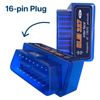
- Mini Bluetooth OBD2 Car Code Reader - This compact Bluetooth OBD2 scanner V2.1 allows you access to your vehicle’s internal information through a Bluetooth device like your phone, tablet or laptop. This way you can retrieve information about the engine, emissions, and other relevant data. You can find out why your engine light is on and solve simple problems by yourself. Be aware: the sticker on the OBD2 may differ from the images shown!
- Reading and Clearing Error Messages – The OBD2 car code reader can interpret and clear over 3000 different error messages. This makes the compact car scanner able to interpret fault codes, clear car fault codes, display sensor data such as engine speed, coolant temperature, car speed, intake manifold pressure, air temperature intake pressure, air flow, throttle position, oxygen sensor voltage, fuel pressure and more.
- Car Compatibility – Always be vigilant about compatibility so the scanner can work effectively. American-made cars manufactured after 1996 should have no issues, while European cars may only be compatible if they were made after 2003. There must be a 16-pin data link connector under the dashboard and the vehicle emission control information label must state that the vehicle is OBD2 compliant. Beware: Not for electric vehicles, hybrids and some diesel vehicles!
- Compatible with Android and iOS – The scanner works with third-party OBD apps like Faslink x, DashCommand, Torque, Infocar, Auto doctor, Four Stroke or OBD Fusion. The effectiveness of the scanner may be influenced by the specific 3rd party software you pick. If the scanner doesn't work, the issue is likely related to the software being used, and switching to a different software could potentially resolve the problem.
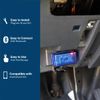
- How to Use the Car Scanner – 1. Plug the device in your car's OBD2 port which typically is located under the dashboard - 2. Start the car - 3. Enable Bluetooth on your phone or tablet - 4. Run the installed app - 5. Search for "OBD2" and connect it with your device through the app (pin 1234 or 0000) - 6. Wait until it connects your car's ECU successfully – 7. Always take the scanner out of your car after you’re done. Leaving the scanner in the OBD port can slowly drain your battery over time.
- Color: Mini 2.1
- Manufacturer: MMOBIEL
- Model Number: OBD2 Bluetooth
- Package Quantity: 1
- Part Number: OBD2 Bluetooth
Mini OBD2 Car Scanner Tool
The OBD2 Scanner with Bluetooth V2.1 gives you access to information about your vehicle's engine, emissions, and other relevant data via your phone, tablet or computer through Bluetooth. You can find out why your engine light is on and fix simple problems on your own, making the scanner extremely convenient for any technician or vehicle owner.
More Than a Diagnostics Scanner
The OBD2 car code reader is able to read and interpret over 3000 different error messages so you will always know precisely what the problems are. Besides that, the car diagnostics tool makes it possible to interpret fault codes, clear car fault codes, display sensor data such as engine speed, coolant temperature, car speed and more.
Important: Always take the scanner out of the OBD port. Leaving the scanner in the OBD port can slowly drain your battery over time.
Compatibility
American-made cars manufactured after 1996 should have no issues, while European cars may only be compatible if they were made after 2003. There must be a 16-pin data link connector under the dashboard and the vehicle emission control information label must state that the vehicle is OBD2 compliant. Important: Not for EVs, hybrids and some diesel vehicles!
It is crucial to be vigilant about compatibility to ensure that this car scanner will work for your vehicle.
The car code reader is compatible with Android, iOS, and Windows devices. To connect the scanner to your Bluetooth device, you need to use 3rd party app. The effectiveness of the scanner may be influenced by the specific 3rd party program you choose. If the scanner doesn't work switching to a different software could likely resolve the problem.
Shipping Overview:
• Shipping: Standard Domestic Shipping within the United States charges first item USD 6.99 and additional item USD 3.0 each. Standard International Shipping from United Kingdom, Germany, Italian and Japan to the United States charges first item USD 11.99 and additional item USD 4.0 each.
• Import Duty: Everymarket collects applicable duties and taxes on goods imported into the U.S. at checkout, it's calculated based on the goods value multiply by the rate. For United Kingdom and China goods is 10%, Germany, Italian and Japan goods is 15%. We are committed to making your U.S. shopping experience simple and transparent. The method of delivery—either Delivered Duty Paid (DDP) or Delivered Duty Unpaid (DDU)—depends on whether duties and taxes are collected at the time of your purchase.
• Order Processing: Please allow 1-2 business days for order processing and preparation before shipment.
• Domestic Shipping: Orders within the U.S. are shipped via USPS or FedEx, depending on the origin of the product. Average transit times to the United States is 3 - 7 Business days and average transit times to International is 7 - 14 Business days
• International Shipping: Currently, we only ship within the USA.
• Tracking Information: Every order is trackable. You will receive a tracking number once your order has been shipped. Products may be shipped from various global fulfillment centers.
Shipping Delays:
Please note that shipping times may vary due to factors beyond our control, such as weather conditions, natural disasters, or peak holiday periods. While we strive to ensure timely delivery, the exact arrival time cannot be guaranteed and is managed by the shipping carrier.
Shipping Options:
-
Standard Delivery: Most orders are shipped within 3-7 business days. Larger items may utilize LTL shipping for safe handling.
-
Handling Time: We handle shipments on business days (Monday - Friday), with a preparation time of 1-2 days.
-
Additional Charges: Some items require additional shipping charges due to their size, weight, or special handling. These charges are specified on the product pages and are not eligible for shipping discounts.
-
Exclusions: Gift cards, packaging, taxes, and prior purchases do not count toward the minimum purchase requirement for free shipping. This offer is valid only for shipments to U.S. addresses, including Puerto Rico.
Delivery Details:
-
Estimates: Standard shipping within the US typically takes 3-7 business days. These are estimates and not guarantees.
-
Shipping Restrictions: We ship to all 50 states, Washington, DC, U.S. territories, and APO/FPO/DPO addresses. Shipping options vary based on the delivery address.
-
Remote Areas: Shipments to remote areas may incur additional charges or require pickup from a nearby shipping partner’s location.
Shipping Confirmation:
You will receive a shipping confirmation email with a tracking number as soon as your order is dispatched. If you do not receive this email immediately, please be assured that your items will arrive within the estimated delivery window provided at checkout.
Order Modifications:
If you need to cancel or modify your order, please contact our customer support immediately.
Issues with Delivery:
If your order shows as delivered but you have not received it, please contact the shipping carrier directly to resolve the issue. For persistent problems, contact our customer service at cs@everymarket.com.
Customer Support:
Our team is available 24/7 to assist you with any questions or concerns regarding your order. We are committed to ensuring a smooth shopping experience.
Return & Refund Policy Overview
Please review our return and refund policies below to ensure a smooth transaction process.
Return Policy
-
Duration: You have 30 days from receiving your item to initiate a return.
-
Condition: Items must be unworn, unwashed, with original tags and packaging intact.
-
Shipping Costs:
- If your return is approved due to a defective, damaged, or incorrect item, we will provide a prepaid return shipping label at no cost.
- If the item has no quality issues and matches the product listing and description, please contact our Customer Service team before returning it. Once your return is authorized, you must return the item according to the provided instructions. In this case, the return shipping cost is the customer's responsibility.
- We are not responsible for return shipping costs for items returned without prior authorization. -
Packaging: Ensure returned items are well-packaged to avoid damage during transit.
-
Tracking: Use a trackable and insured shipping method as we are not liable for items lost or damaged on return.
-
Initiating a Return: Contact us at cs@everymarket.com to start your return. We will provide a return shipping label and instructions upon approval. Returns without prior approval will not be accepted.
How to Return
-
Method: Returns must be sent back by mail to the address provided in the return instructions.
Return Label
-
Please contact us to get return labels.
Product Conditions for Return
-
Eligible Products: Returns are only accepted for items in new condition.
Nonreturnable Items
Certain items are not eligible for return:
-
Electronic devices after 30 days (e.g., computers, laptops, Kindles)
-
Gift cards, prepaid game cards
-
Perishable goods, live insects, some jewelry, some health and personal care items
-
Customized or personalized products
-
Items with special shipping restrictions
Refund Policy
-
Window: Eligible products may be returned within 30 days of delivery for a refund.
-
Refund Method: Refunds are processed to the original payment method or as store credit for items purchased with gift cards.
-
Processing Time: Refunds are processed within 3-5 business days after we receive the return; please allow additional time for shipping and bank processing.
Claims
Inspect your order upon arrival and report any defects, damages, or incorrect items immediately to allow us to address the issue. For claims, contact our support team with details of the issue.
Exchange Policy
For the quickest service, return your original item and place a new order for the desired product once your return is accepted.
Return Address
EveryMarket Customer Service 2101 E Terra Ln, O'Fallon, MO 63366
Customer Support
Available 24/7 for any questions or assistance needed:
-
Phone: +1 (800) 660-3783
-
Email: cs@everymarket.com
- Mini Bluetooth OBD2 Car Code Reader - This compact Bluetooth OBD2 scanner V2.1 allows you access to your vehicle’s internal information through a Bluetooth device like your phone, tablet or laptop. This way you can retrieve information about the engine, emissions, and other relevant data. You can find out why your engine light is on and solve simple problems by yourself. Be aware: the sticker on the OBD2 may differ from the images shown!
- Reading and Clearing Error Messages – The OBD2 car code reader can interpret and clear over 3000 different error messages. This makes the compact car scanner able to interpret fault codes, clear car fault codes, display sensor data such as engine speed, coolant temperature, car speed, intake manifold pressure, air temperature intake pressure, air flow, throttle position, oxygen sensor voltage, fuel pressure and more.
- Car Compatibility – Always be vigilant about compatibility so the scanner can work effectively. American-made cars manufactured after 1996 should have no issues, while European cars may only be compatible if they were made after 2003. There must be a 16-pin data link connector under the dashboard and the vehicle emission control information label must state that the vehicle is OBD2 compliant. Beware: Not for electric vehicles, hybrids and some diesel vehicles!
- Compatible with Android and iOS – The scanner works with third-party OBD apps like Faslink x, DashCommand, Torque, Infocar, Auto doctor, Four Stroke or OBD Fusion. The effectiveness of the scanner may be influenced by the specific 3rd party software you pick. If the scanner doesn't work, the issue is likely related to the software being used, and switching to a different software could potentially resolve the problem.
- How to Use the Car Scanner – 1. Plug the device in your car's OBD2 port which typically is located under the dashboard - 2. Start the car - 3. Enable Bluetooth on your phone or tablet - 4. Run the installed app - 5. Search for "OBD2" and connect it with your device through the app (pin 1234 or 0000) - 6. Wait until it connects your car's ECU successfully – 7. Always take the scanner out of your car after you’re done. Leaving the scanner in the OBD port can slowly drain your battery over time.
- Color: Mini 2.1
- Manufacturer: MMOBIEL
- Model Number: OBD2 Bluetooth
- Package Quantity: 1
- Part Number: OBD2 Bluetooth
Mini OBD2 Car Scanner Tool
The OBD2 Scanner with Bluetooth V2.1 gives you access to information about your vehicle's engine, emissions, and other relevant data via your phone, tablet or computer through Bluetooth. You can find out why your engine light is on and fix simple problems on your own, making the scanner extremely convenient for any technician or vehicle owner.
More Than a Diagnostics Scanner
The OBD2 car code reader is able to read and interpret over 3000 different error messages so you will always know precisely what the problems are. Besides that, the car diagnostics tool makes it possible to interpret fault codes, clear car fault codes, display sensor data such as engine speed, coolant temperature, car speed and more.
Important: Always take the scanner out of the OBD port. Leaving the scanner in the OBD port can slowly drain your battery over time.
Compatibility
American-made cars manufactured after 1996 should have no issues, while European cars may only be compatible if they were made after 2003. There must be a 16-pin data link connector under the dashboard and the vehicle emission control information label must state that the vehicle is OBD2 compliant. Important: Not for EVs, hybrids and some diesel vehicles!
It is crucial to be vigilant about compatibility to ensure that this car scanner will work for your vehicle.
The car code reader is compatible with Android, iOS, and Windows devices. To connect the scanner to your Bluetooth device, you need to use 3rd party app. The effectiveness of the scanner may be influenced by the specific 3rd party program you choose. If the scanner doesn't work switching to a different software could likely resolve the problem.
Shipping Overview:
• Shipping: Standard Domestic Shipping within the United States charges first item USD 6.99 and additional item USD 3.0 each. Standard International Shipping from United Kingdom, Germany, Italian and Japan to the United States charges first item USD 11.99 and additional item USD 4.0 each.
• Import Duty: Everymarket collects applicable duties and taxes on goods imported into the U.S. at checkout, it's calculated based on the goods value multiply by the rate. For United Kingdom and China goods is 10%, Germany, Italian and Japan goods is 15%. We are committed to making your U.S. shopping experience simple and transparent. The method of delivery—either Delivered Duty Paid (DDP) or Delivered Duty Unpaid (DDU)—depends on whether duties and taxes are collected at the time of your purchase.
• Order Processing: Please allow 1-2 business days for order processing and preparation before shipment.
• Domestic Shipping: Orders within the U.S. are shipped via USPS or FedEx, depending on the origin of the product. Average transit times to the United States is 3 - 7 Business days and average transit times to International is 7 - 14 Business days
• International Shipping: Currently, we only ship within the USA.
• Tracking Information: Every order is trackable. You will receive a tracking number once your order has been shipped. Products may be shipped from various global fulfillment centers.
Shipping Delays:
Please note that shipping times may vary due to factors beyond our control, such as weather conditions, natural disasters, or peak holiday periods. While we strive to ensure timely delivery, the exact arrival time cannot be guaranteed and is managed by the shipping carrier.
Shipping Options:
-
Standard Delivery: Most orders are shipped within 3-7 business days. Larger items may utilize LTL shipping for safe handling.
-
Handling Time: We handle shipments on business days (Monday - Friday), with a preparation time of 1-2 days.
-
Additional Charges: Some items require additional shipping charges due to their size, weight, or special handling. These charges are specified on the product pages and are not eligible for shipping discounts.
-
Exclusions: Gift cards, packaging, taxes, and prior purchases do not count toward the minimum purchase requirement for free shipping. This offer is valid only for shipments to U.S. addresses, including Puerto Rico.
Delivery Details:
-
Estimates: Standard shipping within the US typically takes 3-7 business days. These are estimates and not guarantees.
-
Shipping Restrictions: We ship to all 50 states, Washington, DC, U.S. territories, and APO/FPO/DPO addresses. Shipping options vary based on the delivery address.
-
Remote Areas: Shipments to remote areas may incur additional charges or require pickup from a nearby shipping partner’s location.
Shipping Confirmation:
You will receive a shipping confirmation email with a tracking number as soon as your order is dispatched. If you do not receive this email immediately, please be assured that your items will arrive within the estimated delivery window provided at checkout.
Order Modifications:
If you need to cancel or modify your order, please contact our customer support immediately.
Issues with Delivery:
If your order shows as delivered but you have not received it, please contact the shipping carrier directly to resolve the issue. For persistent problems, contact our customer service at cs@everymarket.com.
Customer Support:
Our team is available 24/7 to assist you with any questions or concerns regarding your order. We are committed to ensuring a smooth shopping experience.
Return & Refund Policy Overview
Please review our return and refund policies below to ensure a smooth transaction process.
Return Policy
-
Duration: You have 30 days from receiving your item to initiate a return.
-
Condition: Items must be unworn, unwashed, with original tags and packaging intact.
-
Shipping Costs:
- If your return is approved due to a defective, damaged, or incorrect item, we will provide a prepaid return shipping label at no cost.
- If the item has no quality issues and matches the product listing and description, please contact our Customer Service team before returning it. Once your return is authorized, you must return the item according to the provided instructions. In this case, the return shipping cost is the customer's responsibility.
- We are not responsible for return shipping costs for items returned without prior authorization. -
Packaging: Ensure returned items are well-packaged to avoid damage during transit.
-
Tracking: Use a trackable and insured shipping method as we are not liable for items lost or damaged on return.
-
Initiating a Return: Contact us at cs@everymarket.com to start your return. We will provide a return shipping label and instructions upon approval. Returns without prior approval will not be accepted.
How to Return
-
Method: Returns must be sent back by mail to the address provided in the return instructions.
Return Label
-
Please contact us to get return labels.
Product Conditions for Return
-
Eligible Products: Returns are only accepted for items in new condition.
Nonreturnable Items
Certain items are not eligible for return:
-
Electronic devices after 30 days (e.g., computers, laptops, Kindles)
-
Gift cards, prepaid game cards
-
Perishable goods, live insects, some jewelry, some health and personal care items
-
Customized or personalized products
-
Items with special shipping restrictions
Refund Policy
-
Window: Eligible products may be returned within 30 days of delivery for a refund.
-
Refund Method: Refunds are processed to the original payment method or as store credit for items purchased with gift cards.
-
Processing Time: Refunds are processed within 3-5 business days after we receive the return; please allow additional time for shipping and bank processing.
Claims
Inspect your order upon arrival and report any defects, damages, or incorrect items immediately to allow us to address the issue. For claims, contact our support team with details of the issue.
Exchange Policy
For the quickest service, return your original item and place a new order for the desired product once your return is accepted.
Return Address
EveryMarket Customer Service 2101 E Terra Ln, O'Fallon, MO 63366
Customer Support
Available 24/7 for any questions or assistance needed:
-
Phone: +1 (800) 660-3783
-
Email: cs@everymarket.com
Oops!
Sorry, it looks like some products are not available in selected quantity.