






PCB Design Software Ultimate Edition Circuit Simulation & CAD Tools for Electronics Engineers | Virtual Labs, PCB Layout Design | Learn Electronics for Beginners & Experts | Windows

- Full electronic Schematic editor
- Circuit diagram design
- Schematic capture
- Automatic wiring
- Customizable component library
- Full PCB Board editor
- 176 Circuit and PCB design examples
- Auto component placement
- Gerber Export 274-D - 274-X format
- Virtual instruments
- Manufacturer: ECM
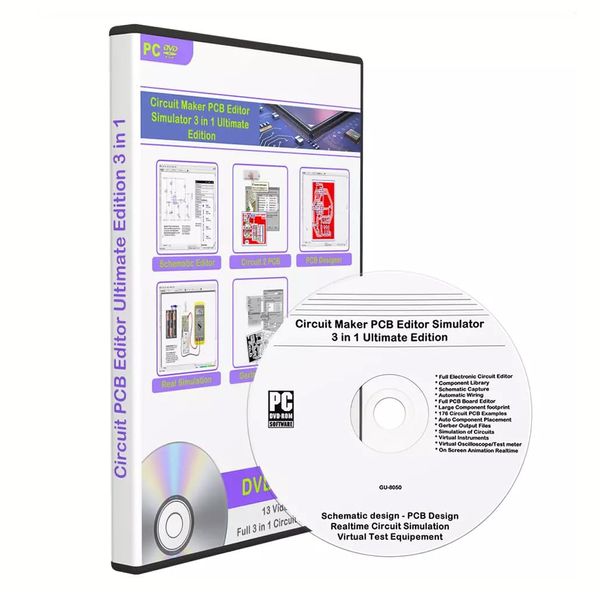
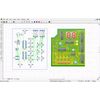
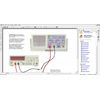
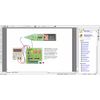
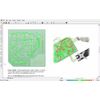
Combination of circuit design, PCB design, simulation, Virtual Test diagnostic equipment this DVD-Rom is the ultimate electronics software suite for students and educational departments and professional engineers to design and test new circuits before manufacturing. You can design and build your electronic circuit, then test it in the simulator to check it is operating correctly. You can attach probes, test meter analysers scilloscope and check in Realtime your circuit before sending to the pcb editor. Ultimate electronics learning software 3 in 1 from start to finish you can create basic to professional circuits and turn them into finished PCB products. Includes many example circuits and board designs to experiment and learn with straight away. It also includes fault finding exercises and diagnosing electronic problems. With Oscilloscope, test meter and analyser you have all the tools to test and learn about electronics and fault finding. Features: CIRCUIT MAKER Full electronic Schematic editor Circuit diagram design Component library Schematic capture Automatic wiring Nets and virtual connections Customizable component library Interactive component and pin hints PCB Full PCB Board editor Large component - Footprint library 1500+ Create your own component libraries ANSI and DIN symbols 176 Circuit and PCB design examples Circuit schematics convert to PCB Auto component placement Auto Track routing 1 or 2 layer Bill of materials Gerber Export 274-D - 274-X format NC Drill file export Excellon format Nets and virtual connections Capable text and drawing tools included SIMULATOR Virtual instruments Virtual test probes Interactive circuit diagram simulation On-screen animation Simulating PCBs simulation powered by SPICE for fast, accurate results Simulation of component destruction Component fault simulation BONUS CONTENT 10 PCB Tutorial Videos 3 Video Instruction guides Built in User manual 10 PCB Manufacturing books (After Feedback left) 6 Lessons in electronics books (After Feedback left) 8 Electronic advanced books (After Feedback left) Video Training Course worth £60 (After Feedback left) With Electronic Schematic Editor you can select components easily from the libray popup window, from resistors transistors, diodes to LEDs, push buttons to switches Processors to Timers they can all be selected and placed on your circuit quickly and simply. Choose from a huge database of over 2,000 analogue/digital components covering all of the standard devices commonly available in schools and colleges. Joining the components using wire, bus is guided and quick with simple left click change direction and right click end connection. Snap to each component. You can export the circuit directly to PCB editor once saved Built in component Library there is over 1500+ symbols and footprints to design and build your circuits and boards. Covered are the main General components from Batteries and power sources to Resistors, Diodes, Transistors, Capacitors, Fuses, Switches, Buttons, ICs, CPUs, Logic gates, Timers. You can also add your own components and create your own personal Libraries. Intelligent wiring automatically routes your circuit as you draw. Life-like components 3D-style elementary components. They look just like the real-thing and are ideal for helping those at an introductory level make the leap between understanding schematic diagrams and real circuits. Watch elementary components animate and current flow along wires. Take voltage readings and hook up test instruments. Investigate a wide range of different components including switches, sensors, diodes, timers, transistors, logic gates and amplifiers. This virtual tools option makes creating a circuit and testing it become a real experience without the risks and costs. Test your circuit diagrams on-screen with the world's leading simulator. Offering unparalleled levels of accuracy, Circuit Simulators SPICE simulation engine means you can design with confidence knowing that your circuits will always work when you come to make them. Using the test probes and virtual instruments means you can test all aspects of your circuits. Simulating circuit diagrams, build your circuit and then watch it in real time action with Circuit Simulator SPICE simulation engine which is much faster than rival electronics design software. Advanced computer-modelling techniques show you what happens inside components and connecting wires during simulation. Realistic simulation of component ratings and destruction. This part of the software enables you to see whats happening with each part of your circuit. Simulating PCBs you can Test your PCBs on-screen prior to manufacture with the world's only true PCB simulator. Unlike our competitor's software, Circuit maker actually simulates the tracks, pads, components, flying wires and power supply. This means you can have confidence that if your PCB works on-screen, it will also work when you come to make it for real. PCB simulation powered by SPICE for fast, accurate results. Unique animation shows you what happens inside components and connecting tracks during simulation. With PCB Board Editor Professional you can import your Circuit Schematic and design your PCB Board with ease. Once the circuit is placed inside the editor there are powerful tools to Autoplace and Autoroute the Track connections. You can also manually modify the track route and components. You can also design your board manaully by adding footprint components from library and design from external schematic or even from printed paper diagrams. There is over 1500 components in library as well as the option to create your own footprints. Once your PCB board is complete you can print, export NC file or Gerber export ready for manufacturing. The PCB Board editor has the option to import your circuit from schematic to PCB editor, from here you can see the components not placed on the board. You can now use the tools Autoplace and watch them auto place and connect onto the circuit board. The best route is calculated and the tracks are automatically placed and connected. You can then check and manually adjust if needed, or move your component to another location and re-route. Circuit maker ultimate has the benifits of autorouting your circuit to the PCB board to speed up design and create the ultimate route for your PCB layout. Components are auto placed and the tracks and pads are autoplaced for optimum performance. Your PCB editor comes with 3 Videos on using Circuit maker pcb editor ultimate edition and 10 Video tutorials on PCB Design and Manufacturing. 1. Circuit maker ultimate edition Tutorial. 2. Circuit maker ultimate edition Step by Step Tutorial. 3.Creating a PCB manually in Circuit maker ultimate edition 4. TUTORIAL How to Make Your Own DIY PCBs Part 1 5. TUTORIAL How to Make Your Own DIY PCBs Part 2 6. DIY PCBs At Home Single Sided Presensitized 7. From Idea to Schematic to PCB How to do it easily 8. How to make a Printed Circuit Board PCB at home 9. PCB Creation for Beginners Start to finish tutorial in 10 minutes 10. How to Make a Custom PCB Part 1 Making the Schematic 11. How to Make a Custom PCB Part 2 Making the PCB 12. Make professional PCB at home with cnc prototyping machine WEGSTR 13. PCB production technology full movie You will also receive our exclusive offer of 10 Bonus Books on PCB Design and manufacture. Simply leave 5 Star ratings and feedback to automatically receive your books. 1. Jumpstarting Your Own PCBs Learn How to Design 2. Printed Circuits Handbook 3. Right the First Time a Practical Handbook 4. Practical Guide and PCB Design 2021 5. PCB Design for Real World EMI Control 6. Signal integrity issues and printed circuit board design 7. Complete PCB Design Using OrCAD Capture 8. Modeling and Design of Electromagnetic Compatibility 9. The circuit designers companion 10. Reflow Soldering Processes Troubleshooting You will also receive our exclusive offer of 14 Bonus Electronic Beginner and Advanced Training Digital Books. Also Now includes Electronic Circuits Encyclopedia Vol 1 hudreds of circuits to learn and build. 1. Electronics for beginners 2. Basic-Schematic-Interpretation 3. Introduction-to-Basic-Electricity-and-Electronics-Technology 4. The-Art-of-Electronics 5. The-Illustrated-Dictionary-of-Electronics 6. Complete-Digital-Design 7. How-to-make-printed-circuit-boards 8. XYZ-of-Oscilloscopes Lessons in electronics Vol 1 to 6 When you purchase the PCB Board Designer Professional software you will also receive our exclusive offer of PCB Video Training Professional Course usually sold seperatly. This will teach you PCB design and manufacturing.Simply leave 5 Star ratings and feedback to automatically receive your Video Training Course. 1. Introduction 2. Download And Install Software Free 3. Getting Started 4. Customizing Parts 5. Schematic 6. Exproting your design as Imageor PDF 7. Making PCB Part1 8. Making PCB Part2 9. Cleaning Board 10. Finishing Boardand Making it yours 11. Making a more advance random schematic design 12. Print PCB Design on Heat Paper System Requirements: CPU: 1.5Ghz Memory: RAM 128MB minimum Hard drive: 1GB free hard drive space Monitor: 1024x768 resolution Windows XP, Vista, 7, 8, 8.1, 10
Shipping Overview:
• Shipping: Standard Domestic Shipping within the United States charges first item USD 6.99 and additional item USD 3.0 each. Standard International Shipping from United Kingdom, Germany, Italian and Japan to the United States charges first item USD 11.99 and additional item USD 4.0 each.
• Import Duty: Everymarket collects applicable duties and taxes on goods imported into the U.S. at checkout, it's calculated based on the goods value multiply by the rate. For United Kingdom and China goods is 10%, Germany, Italian and Japan goods is 15%. We are committed to making your U.S. shopping experience simple and transparent. The method of delivery—either Delivered Duty Paid (DDP) or Delivered Duty Unpaid (DDU)—depends on whether duties and taxes are collected at the time of your purchase.
• Order Processing: Please allow 1-2 business days for order processing and preparation before shipment.
• Domestic Shipping: Orders within the U.S. are shipped via USPS or FedEx, depending on the origin of the product. Average transit times to the United States is 3 - 7 Business days and average transit times to International is 7 - 14 Business days
• International Shipping: Currently, we only ship within the USA.
• Tracking Information: Every order is trackable. You will receive a tracking number once your order has been shipped. Products may be shipped from various global fulfillment centers.
Shipping Delays:
Please note that shipping times may vary due to factors beyond our control, such as weather conditions, natural disasters, or peak holiday periods. While we strive to ensure timely delivery, the exact arrival time cannot be guaranteed and is managed by the shipping carrier.
Shipping Options:
-
Standard Delivery: Most orders are shipped within 3-7 business days. Larger items may utilize LTL shipping for safe handling.
-
Handling Time: We handle shipments on business days (Monday - Friday), with a preparation time of 1-2 days.
-
Additional Charges: Some items require additional shipping charges due to their size, weight, or special handling. These charges are specified on the product pages and are not eligible for shipping discounts.
-
Exclusions: Gift cards, packaging, taxes, and prior purchases do not count toward the minimum purchase requirement for free shipping. This offer is valid only for shipments to U.S. addresses, including Puerto Rico.
Delivery Details:
-
Estimates: Standard shipping within the US typically takes 3-7 business days. These are estimates and not guarantees.
-
Shipping Restrictions: We ship to all 50 states, Washington, DC, U.S. territories, and APO/FPO/DPO addresses. Shipping options vary based on the delivery address.
-
Remote Areas: Shipments to remote areas may incur additional charges or require pickup from a nearby shipping partner’s location.
Shipping Confirmation:
You will receive a shipping confirmation email with a tracking number as soon as your order is dispatched. If you do not receive this email immediately, please be assured that your items will arrive within the estimated delivery window provided at checkout.
Order Modifications:
If you need to cancel or modify your order, please contact our customer support immediately.
Issues with Delivery:
If your order shows as delivered but you have not received it, please contact the shipping carrier directly to resolve the issue. For persistent problems, contact our customer service at cs@everymarket.com.
Customer Support:
Our team is available 24/7 to assist you with any questions or concerns regarding your order. We are committed to ensuring a smooth shopping experience.
Return & Refund Policy Overview
Please review our return and refund policies below to ensure a smooth transaction process.
Return Policy
-
Duration: You have 30 days from receiving your item to initiate a return.
-
Condition: Items must be unworn, unwashed, with original tags and packaging intact.
-
Shipping Costs:
- If your return is approved due to a defective, damaged, or incorrect item, we will provide a prepaid return shipping label at no cost.
- If the item has no quality issues and matches the product listing and description, please contact our Customer Service team before returning it. Once your return is authorized, you must return the item according to the provided instructions. In this case, the return shipping cost is the customer's responsibility.
- We are not responsible for return shipping costs for items returned without prior authorization. -
Packaging: Ensure returned items are well-packaged to avoid damage during transit.
-
Tracking: Use a trackable and insured shipping method as we are not liable for items lost or damaged on return.
-
Initiating a Return: Contact us at cs@everymarket.com to start your return. We will provide a return shipping label and instructions upon approval. Returns without prior approval will not be accepted.
How to Return
-
Method: Returns must be sent back by mail to the address provided in the return instructions.
Return Label
-
Please contact us to get return labels.
Product Conditions for Return
-
Eligible Products: Returns are only accepted for items in new condition.
Nonreturnable Items
Certain items are not eligible for return:
-
Electronic devices after 30 days (e.g., computers, laptops, Kindles)
-
Gift cards, prepaid game cards
-
Perishable goods, live insects, some jewelry, some health and personal care items
-
Customized or personalized products
-
Items with special shipping restrictions
Refund Policy
-
Window: Eligible products may be returned within 30 days of delivery for a refund.
-
Refund Method: Refunds are processed to the original payment method or as store credit for items purchased with gift cards.
-
Processing Time: Refunds are processed within 3-5 business days after we receive the return; please allow additional time for shipping and bank processing.
Claims
Inspect your order upon arrival and report any defects, damages, or incorrect items immediately to allow us to address the issue. For claims, contact our support team with details of the issue.
Exchange Policy
For the quickest service, return your original item and place a new order for the desired product once your return is accepted.
Return Address
EveryMarket Customer Service 2101 E Terra Ln, O'Fallon, MO 63366
Customer Support
Available 24/7 for any questions or assistance needed:
-
Phone: +1 (800) 660-3783
-
Email: cs@everymarket.com
- Full electronic Schematic editor
- Circuit diagram design
- Schematic capture
- Automatic wiring
- Customizable component library
- Full PCB Board editor
- 176 Circuit and PCB design examples
- Auto component placement
- Gerber Export 274-D - 274-X format
- Virtual instruments
- Manufacturer: ECM
Combination of circuit design, PCB design, simulation, Virtual Test diagnostic equipment this DVD-Rom is the ultimate electronics software suite for students and educational departments and professional engineers to design and test new circuits before manufacturing. You can design and build your electronic circuit, then test it in the simulator to check it is operating correctly. You can attach probes, test meter analysers scilloscope and check in Realtime your circuit before sending to the pcb editor. Ultimate electronics learning software 3 in 1 from start to finish you can create basic to professional circuits and turn them into finished PCB products. Includes many example circuits and board designs to experiment and learn with straight away. It also includes fault finding exercises and diagnosing electronic problems. With Oscilloscope, test meter and analyser you have all the tools to test and learn about electronics and fault finding. Features: CIRCUIT MAKER Full electronic Schematic editor Circuit diagram design Component library Schematic capture Automatic wiring Nets and virtual connections Customizable component library Interactive component and pin hints PCB Full PCB Board editor Large component - Footprint library 1500+ Create your own component libraries ANSI and DIN symbols 176 Circuit and PCB design examples Circuit schematics convert to PCB Auto component placement Auto Track routing 1 or 2 layer Bill of materials Gerber Export 274-D - 274-X format NC Drill file export Excellon format Nets and virtual connections Capable text and drawing tools included SIMULATOR Virtual instruments Virtual test probes Interactive circuit diagram simulation On-screen animation Simulating PCBs simulation powered by SPICE for fast, accurate results Simulation of component destruction Component fault simulation BONUS CONTENT 10 PCB Tutorial Videos 3 Video Instruction guides Built in User manual 10 PCB Manufacturing books (After Feedback left) 6 Lessons in electronics books (After Feedback left) 8 Electronic advanced books (After Feedback left) Video Training Course worth £60 (After Feedback left) With Electronic Schematic Editor you can select components easily from the libray popup window, from resistors transistors, diodes to LEDs, push buttons to switches Processors to Timers they can all be selected and placed on your circuit quickly and simply. Choose from a huge database of over 2,000 analogue/digital components covering all of the standard devices commonly available in schools and colleges. Joining the components using wire, bus is guided and quick with simple left click change direction and right click end connection. Snap to each component. You can export the circuit directly to PCB editor once saved Built in component Library there is over 1500+ symbols and footprints to design and build your circuits and boards. Covered are the main General components from Batteries and power sources to Resistors, Diodes, Transistors, Capacitors, Fuses, Switches, Buttons, ICs, CPUs, Logic gates, Timers. You can also add your own components and create your own personal Libraries. Intelligent wiring automatically routes your circuit as you draw. Life-like components 3D-style elementary components. They look just like the real-thing and are ideal for helping those at an introductory level make the leap between understanding schematic diagrams and real circuits. Watch elementary components animate and current flow along wires. Take voltage readings and hook up test instruments. Investigate a wide range of different components including switches, sensors, diodes, timers, transistors, logic gates and amplifiers. This virtual tools option makes creating a circuit and testing it become a real experience without the risks and costs. Test your circuit diagrams on-screen with the world's leading simulator. Offering unparalleled levels of accuracy, Circuit Simulators SPICE simulation engine means you can design with confidence knowing that your circuits will always work when you come to make them. Using the test probes and virtual instruments means you can test all aspects of your circuits. Simulating circuit diagrams, build your circuit and then watch it in real time action with Circuit Simulator SPICE simulation engine which is much faster than rival electronics design software. Advanced computer-modelling techniques show you what happens inside components and connecting wires during simulation. Realistic simulation of component ratings and destruction. This part of the software enables you to see whats happening with each part of your circuit. Simulating PCBs you can Test your PCBs on-screen prior to manufacture with the world's only true PCB simulator. Unlike our competitor's software, Circuit maker actually simulates the tracks, pads, components, flying wires and power supply. This means you can have confidence that if your PCB works on-screen, it will also work when you come to make it for real. PCB simulation powered by SPICE for fast, accurate results. Unique animation shows you what happens inside components and connecting tracks during simulation. With PCB Board Editor Professional you can import your Circuit Schematic and design your PCB Board with ease. Once the circuit is placed inside the editor there are powerful tools to Autoplace and Autoroute the Track connections. You can also manually modify the track route and components. You can also design your board manaully by adding footprint components from library and design from external schematic or even from printed paper diagrams. There is over 1500 components in library as well as the option to create your own footprints. Once your PCB board is complete you can print, export NC file or Gerber export ready for manufacturing. The PCB Board editor has the option to import your circuit from schematic to PCB editor, from here you can see the components not placed on the board. You can now use the tools Autoplace and watch them auto place and connect onto the circuit board. The best route is calculated and the tracks are automatically placed and connected. You can then check and manually adjust if needed, or move your component to another location and re-route. Circuit maker ultimate has the benifits of autorouting your circuit to the PCB board to speed up design and create the ultimate route for your PCB layout. Components are auto placed and the tracks and pads are autoplaced for optimum performance. Your PCB editor comes with 3 Videos on using Circuit maker pcb editor ultimate edition and 10 Video tutorials on PCB Design and Manufacturing. 1. Circuit maker ultimate edition Tutorial. 2. Circuit maker ultimate edition Step by Step Tutorial. 3.Creating a PCB manually in Circuit maker ultimate edition 4. TUTORIAL How to Make Your Own DIY PCBs Part 1 5. TUTORIAL How to Make Your Own DIY PCBs Part 2 6. DIY PCBs At Home Single Sided Presensitized 7. From Idea to Schematic to PCB How to do it easily 8. How to make a Printed Circuit Board PCB at home 9. PCB Creation for Beginners Start to finish tutorial in 10 minutes 10. How to Make a Custom PCB Part 1 Making the Schematic 11. How to Make a Custom PCB Part 2 Making the PCB 12. Make professional PCB at home with cnc prototyping machine WEGSTR 13. PCB production technology full movie You will also receive our exclusive offer of 10 Bonus Books on PCB Design and manufacture. Simply leave 5 Star ratings and feedback to automatically receive your books. 1. Jumpstarting Your Own PCBs Learn How to Design 2. Printed Circuits Handbook 3. Right the First Time a Practical Handbook 4. Practical Guide and PCB Design 2021 5. PCB Design for Real World EMI Control 6. Signal integrity issues and printed circuit board design 7. Complete PCB Design Using OrCAD Capture 8. Modeling and Design of Electromagnetic Compatibility 9. The circuit designers companion 10. Reflow Soldering Processes Troubleshooting You will also receive our exclusive offer of 14 Bonus Electronic Beginner and Advanced Training Digital Books. Also Now includes Electronic Circuits Encyclopedia Vol 1 hudreds of circuits to learn and build. 1. Electronics for beginners 2. Basic-Schematic-Interpretation 3. Introduction-to-Basic-Electricity-and-Electronics-Technology 4. The-Art-of-Electronics 5. The-Illustrated-Dictionary-of-Electronics 6. Complete-Digital-Design 7. How-to-make-printed-circuit-boards 8. XYZ-of-Oscilloscopes Lessons in electronics Vol 1 to 6 When you purchase the PCB Board Designer Professional software you will also receive our exclusive offer of PCB Video Training Professional Course usually sold seperatly. This will teach you PCB design and manufacturing.Simply leave 5 Star ratings and feedback to automatically receive your Video Training Course. 1. Introduction 2. Download And Install Software Free 3. Getting Started 4. Customizing Parts 5. Schematic 6. Exproting your design as Imageor PDF 7. Making PCB Part1 8. Making PCB Part2 9. Cleaning Board 10. Finishing Boardand Making it yours 11. Making a more advance random schematic design 12. Print PCB Design on Heat Paper System Requirements: CPU: 1.5Ghz Memory: RAM 128MB minimum Hard drive: 1GB free hard drive space Monitor: 1024x768 resolution Windows XP, Vista, 7, 8, 8.1, 10
Shipping Overview:
• Shipping: Standard Domestic Shipping within the United States charges first item USD 6.99 and additional item USD 3.0 each. Standard International Shipping from United Kingdom, Germany, Italian and Japan to the United States charges first item USD 11.99 and additional item USD 4.0 each.
• Import Duty: Everymarket collects applicable duties and taxes on goods imported into the U.S. at checkout, it's calculated based on the goods value multiply by the rate. For United Kingdom and China goods is 10%, Germany, Italian and Japan goods is 15%. We are committed to making your U.S. shopping experience simple and transparent. The method of delivery—either Delivered Duty Paid (DDP) or Delivered Duty Unpaid (DDU)—depends on whether duties and taxes are collected at the time of your purchase.
• Order Processing: Please allow 1-2 business days for order processing and preparation before shipment.
• Domestic Shipping: Orders within the U.S. are shipped via USPS or FedEx, depending on the origin of the product. Average transit times to the United States is 3 - 7 Business days and average transit times to International is 7 - 14 Business days
• International Shipping: Currently, we only ship within the USA.
• Tracking Information: Every order is trackable. You will receive a tracking number once your order has been shipped. Products may be shipped from various global fulfillment centers.
Shipping Delays:
Please note that shipping times may vary due to factors beyond our control, such as weather conditions, natural disasters, or peak holiday periods. While we strive to ensure timely delivery, the exact arrival time cannot be guaranteed and is managed by the shipping carrier.
Shipping Options:
-
Standard Delivery: Most orders are shipped within 3-7 business days. Larger items may utilize LTL shipping for safe handling.
-
Handling Time: We handle shipments on business days (Monday - Friday), with a preparation time of 1-2 days.
-
Additional Charges: Some items require additional shipping charges due to their size, weight, or special handling. These charges are specified on the product pages and are not eligible for shipping discounts.
-
Exclusions: Gift cards, packaging, taxes, and prior purchases do not count toward the minimum purchase requirement for free shipping. This offer is valid only for shipments to U.S. addresses, including Puerto Rico.
Delivery Details:
-
Estimates: Standard shipping within the US typically takes 3-7 business days. These are estimates and not guarantees.
-
Shipping Restrictions: We ship to all 50 states, Washington, DC, U.S. territories, and APO/FPO/DPO addresses. Shipping options vary based on the delivery address.
-
Remote Areas: Shipments to remote areas may incur additional charges or require pickup from a nearby shipping partner’s location.
Shipping Confirmation:
You will receive a shipping confirmation email with a tracking number as soon as your order is dispatched. If you do not receive this email immediately, please be assured that your items will arrive within the estimated delivery window provided at checkout.
Order Modifications:
If you need to cancel or modify your order, please contact our customer support immediately.
Issues with Delivery:
If your order shows as delivered but you have not received it, please contact the shipping carrier directly to resolve the issue. For persistent problems, contact our customer service at cs@everymarket.com.
Customer Support:
Our team is available 24/7 to assist you with any questions or concerns regarding your order. We are committed to ensuring a smooth shopping experience.
Return & Refund Policy Overview
Please review our return and refund policies below to ensure a smooth transaction process.
Return Policy
-
Duration: You have 30 days from receiving your item to initiate a return.
-
Condition: Items must be unworn, unwashed, with original tags and packaging intact.
-
Shipping Costs:
- If your return is approved due to a defective, damaged, or incorrect item, we will provide a prepaid return shipping label at no cost.
- If the item has no quality issues and matches the product listing and description, please contact our Customer Service team before returning it. Once your return is authorized, you must return the item according to the provided instructions. In this case, the return shipping cost is the customer's responsibility.
- We are not responsible for return shipping costs for items returned without prior authorization. -
Packaging: Ensure returned items are well-packaged to avoid damage during transit.
-
Tracking: Use a trackable and insured shipping method as we are not liable for items lost or damaged on return.
-
Initiating a Return: Contact us at cs@everymarket.com to start your return. We will provide a return shipping label and instructions upon approval. Returns without prior approval will not be accepted.
How to Return
-
Method: Returns must be sent back by mail to the address provided in the return instructions.
Return Label
-
Please contact us to get return labels.
Product Conditions for Return
-
Eligible Products: Returns are only accepted for items in new condition.
Nonreturnable Items
Certain items are not eligible for return:
-
Electronic devices after 30 days (e.g., computers, laptops, Kindles)
-
Gift cards, prepaid game cards
-
Perishable goods, live insects, some jewelry, some health and personal care items
-
Customized or personalized products
-
Items with special shipping restrictions
Refund Policy
-
Window: Eligible products may be returned within 30 days of delivery for a refund.
-
Refund Method: Refunds are processed to the original payment method or as store credit for items purchased with gift cards.
-
Processing Time: Refunds are processed within 3-5 business days after we receive the return; please allow additional time for shipping and bank processing.
Claims
Inspect your order upon arrival and report any defects, damages, or incorrect items immediately to allow us to address the issue. For claims, contact our support team with details of the issue.
Exchange Policy
For the quickest service, return your original item and place a new order for the desired product once your return is accepted.
Return Address
EveryMarket Customer Service 2101 E Terra Ln, O'Fallon, MO 63366
Customer Support
Available 24/7 for any questions or assistance needed:
-
Phone: +1 (800) 660-3783
-
Email: cs@everymarket.com
Oops!
Sorry, it looks like some products are not available in selected quantity.